
J’ai pu voir des appels à l’API : api.ipify.org
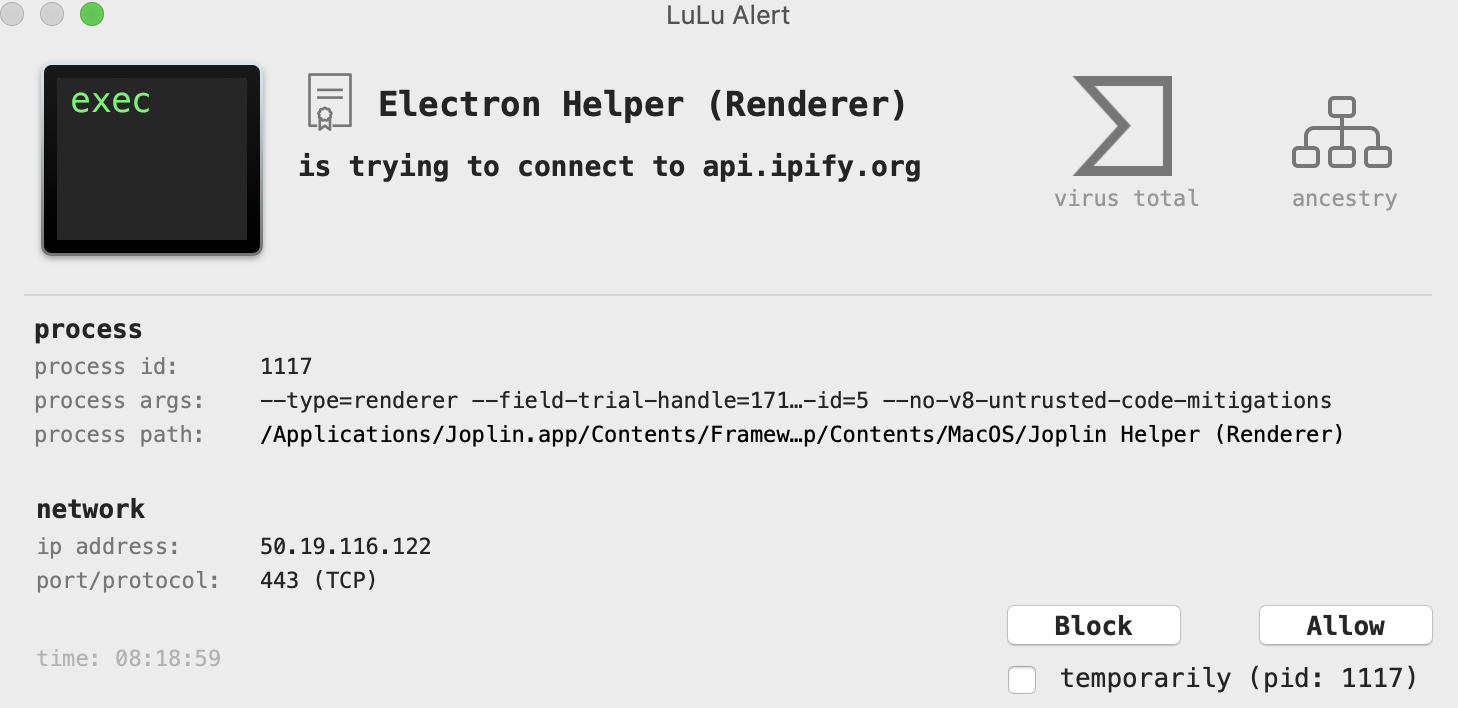
Il y a donc l’utilisation d’une API pour la géolocalisation des IP. Je sais pas si c’est très bien …
A suivre.
My script to rename tacitpart file :
#!/bin/bash

# ARIAS Frederic
#
# For MAC OS do
#

suffix=".tacitpart"
path="WebDAV"

for file in $path/*.tacitpart
do
    if [[ -f $file ]]; then
	filenew=$(basename $file $suffix)
        echo $file" -> "$filenew
	mv $file $path/$filenew
	touch $path/$filenew
    fi
done

#
for file in $path/.resource/*.tacitpart
do
    if [[ -f $file ]]; then
	$filenew = ${file/%$suffix}
        echo $file." -> ".$filenew
        mv $file $path/.resource/$filenew
        touch $path/.resource/$filenew
    fi
doneJ’ai découvert ce superbe logiciel : Joplin, et je l’ai utilisé de façon intensive jusqu’à ce que le WebDav en HTTP ne soit plus possible. Ensuite cela a été la galère pour synchroniser les notes. J’ai cru pendant un moment que le problème allait être rapidement corriger … mais non. Mon précédent POST sur le problème : https://www.cyber-neurones.org/2019/07/android-joplin-synchronisation-webdav-en-http-est-hs/ . Le problème est ouvert depuis le 17 juin, et on est le 8 septembre …
Depuis deux versions il est impossible de faire une synchronisation via WebDAV , j’ai même essayé avec une clef privé ou une clef publique mais cela n’a pas fonctionné.
Les deux versions de Joplin pour Android (je conseille donc de ne pas faire la mise à jours) : https://play.google.com/store/apps/details?id=net.cozic.joplin&hl=fr
J’ai ouvert un ticket mais dans réelle solution : https://discourse.joplinapp.org/t/webdav-not-work-with-last-release-of-android/2696 :
Hi, Since the last update of Joplin, I can’t sync with WebDAV. I put a tcpdump on port of WebDAV but I don’t see any request … I try to remove and reinstall the app, but I have a same issue. How I can have more logs on Joplin (Android) ? Thanks. Frédéric.
Here the script in Python : https://github.com/CYBERNEURONES/Python/blob/master/JoplinCleanRessource.py
#
# Version 1
# for Python 3
#
#   ARIAS Frederic
#   Sorry ... It's difficult for me the python :)
#

from time import gmtime, strftime
import time
import json
import requests
import os
import sqlite3
import re

#conn = sqlite3.connect('my_db.db')
find_this = "\(:/"

#c = conn.cursor()
#c.execute('''DROP TABLE LINK''')
#conn.commit()
#c.execute('''CREATE TABLE LINK (ID_NOTE text, ID_RESOURCE text, CHECKSUM_MD5 text)''')
#conn.commit()

#IP
ip = "127.0.0.1"
port = "41184"
token = "Put the token here"
nb_request = 0
my_body = ""
headers = {'Content-type': 'application/json', 'Accept': 'text/plain'}
url_notes = (
    "http://"+ip+":"+port+"/notes?"
    "token="+token
)
nb_total_ressource = 0
nb_local_ressource = 0
ALL_ID = {}
try:
    resp = requests.get(url_notes, headers=headers)
    nb_request += 1
    resp.raise_for_status()
    resp_dict = resp.json()
    #print(resp_dict)
    for my_note in resp_dict:
        nb_local_ressource = 0
        my_body = my_note.get('body')
        my_ressource = [m.start() for m in re.finditer(find_this, my_body)]
        for my_ressource_x in my_ressource:
             nb_total_ressource += 1
             nb_local_ressource += 1
             my_ressource_id = my_body[my_ressource_x+3:my_ressource_x+32+3]
             print(nb_local_ressource,":",my_note.get('id'),":",my_ressource_id)
             ALL_ID[my_ressource_id]=my_note.get('id')

             #c.execute(sql_request)
             #conn.commit()
except requests.exceptions.HTTPError as e:
    print("Bad HTTP status code:", e)
except requests.exceptions.RequestException as e:
    print("Network error:", e)

nb_keep = 0
nb_remove = 0
url_resources = (
    "http://"+ip+":"+port+"/resources?"
    "token="+token
)
try:
    resp = requests.get(url_resources, headers=headers)
    nb_request += 1
    resp.raise_for_status()
    resp_dict = resp.json()
    #print(resp_dict)
    for my_resource in resp_dict:
        my_id = my_resource.get('id')
        if my_id in ALL_ID:
            print("Keep for notes",ALL_ID[my_id])
            nb_keep += 1
        else:
            print("Remove");
            nb_remove += 1
            url_resources_delete = (
    "http://"+ip+":"+port+"/resources/"+my_id+"?"
    "token="+token
)
            try:
                 resp2 = requests.delete(url_resources_delete, headers=headers)
                 resp.raise_for_status()
                 nb_request += 1
            except requests.exceptions.HTTPError as e:
                 print("Bad HTTP status code:", e)
            except requests.exceptions.RequestException as e:
                 print("Network error:", e)
except requests.exceptions.HTTPError as e:
    print("Bad HTTP status code:", e)
except requests.exceptions.RequestException as e:
    print("Network error:", e)

#conn.close()
print("nb_request",nb_request,"nb_total_ressource : ",nb_total_ressource," nb_local_ressource : ",nb_local_ressource)
print("nb_keep",nb_keep,"nb_remove",nb_remove);
Here the result :
Il reste encore du travail à faire … mais cette application est vraiment très bien. J’ai fait énormément de test avec beaucoup de donnée, et je n’ai pas eu de problème.
La nouvelle version arrive avec quelques fix et des améliorations :


On peut même faire du KaTeX !
J’ai voulu tester Joplin https://joplin.cozic.net entièrement, pas seulement la synchronisation de 2 ou 3 fichiers.
J’ai donc fait une base de 2465 notes, et 9787 images :
: "Total folders: 32"
: "Total notes: 2465"
: "Total resources: 9787"
Mon fichier WebDEV :
$ du -sh WebDAV/
2,7G	WebDAV/
$ ls -l WebDAV/*.md | wc -l
-bash: /bin/ls: Argument list too long
       0
Il y a tellement de fichier que la commande “ls” plante :) , en fait il y a 13051 fichiers pour 2,7 Go. Le fichier le plus gros fait 13 Ko.
Step 0 : Install Joplin and activate the REST API ( https://joplin.cozic.net/api/ ) .
Step 1: Install nltk and worldcloud with pip ( for more information see https://www.datacamp.com/community/tutorials/wordcloud-python )
Step 3.a : Run this scripts for Title (change the token)
#
# Version 1
# for Python 3
#
#   ARIAS Frederic
#   Sorry ... It's difficult for me the python :)
#

from time import gmtime, strftime
import time
import json
import requests
import os
import nltk
nltk.download('punkt')
nltk.download('stopwords')
from nltk.tokenize import word_tokenize
from nltk.corpus import stopwords
from wordcloud import WordCloud
import numpy as np
import matplotlib.pyplot as plt

#IP
ip = "127.0.0.1"
#Port
port = "41184"
#Token
token = "Put your token here"
nb_request = 0
my_title = ""
headers = {'Content-type': 'application/json', 'Accept': 'text/plain'}
url_notes = (
    "http://"+ip+":"+port+"/notes?"
    "token="+token
)
try:
    resp = requests.get(url_notes, headers=headers)
    nb_request += 1
    resp.raise_for_status()
    resp_dict = resp.json()
    #print(resp_dict)
    for my_note in resp_dict:
        #print(my_note.get('id'))
        my_title += my_note.get('title')
except requests.exceptions.HTTPError as e:
    print("Bad HTTP status code:", e)
except requests.exceptions.RequestException as e:
    print("Network error:", e)

# Create a word cloud image
stopwords = stopwords.words('french')
wc = WordCloud(background_color="white", max_words=5000, stopwords=stopwords, contour_width=3, contour_color='firebrick')
wc.generate(my_title)
wc.to_file("jopling_title.png")
plt.figure(figsize=[18,8])
plt.imshow(wc, interpolation='bilinear')
plt.axis("off")
plt.show()
Step 3.b : Run this scripts for Body (change the token)
Awesome Note 2, it’s very popular on iPad :

The new All-in-one Organizer, Awesome Note 2 is integrated with note and schedule management.
And now it’s available!!WONDERFUL WRITING FEATURES
· It can be used not only for simple notes, but also rich and wonderful writing tool.
· Make notes even more powerful to add photos, voice recording and drawings.
· Easily create diary notes to display feeling, weather or road map information.





