
J’ai pu voir l’erreur suivante :
Module yaml error: Unexpected key in data: static_context [line 9 col 3]Pour fixer le problème :
# yum update libmodulemd
rabbitmq_erlang                                                                                        315  B/s | 833  B     00:02
rabbitmq_erlang-source                                                                                 489  B/s | 819  B     00:01
Module yaml error: Unexpected key in data: static_context [line 9 col 3]
Module yaml error: Unexpected key in data: static_context [line 9 col 3]
Dépendances résolues.
=======================================================================================================================================
 Paquet                         Architecture              Version                           Dépôt                                Taille
=======================================================================================================================================
Mise à jour:
 libmodulemd                    x86_64                    2.13.0-1.el8                      ol8_baseos_latest                    233 k

Résumé de la transaction
=======================================================================================================================================
Mettre à niveau  1 Paquet

Taille totale des téléchargements : 233 k
Voulez-vous continuer ? [o/N] : o
Téléchargement des paquets :
libmodulemd-2.13.0-1.el8.x86_64.rpm                                                                    3.4 MB/s | 233 kB     00:00
---------------------------------------------------------------------------------------------------------------------------------------
Total                                                                                                  3.2 MB/s | 233 kB     00:00
Test de la transaction
La vérification de la transaction a réussi.
Lancement de la transaction de test
Transaction de test réussie.
Exécution de la transaction
  Préparation           :                                                                                                          1/1
  Mise à jour           : libmodulemd-2.13.0-1.el8.x86_64                                                                          1/2
  Nettoyage de          : libmodulemd-2.9.4-2.el8.x86_64                                                                           2/2
  Exécution du scriptlet: libmodulemd-2.9.4-2.el8.x86_64                                                                           2/2
  Vérification de       : libmodulemd-2.13.0-1.el8.x86_64                                                                          1/2
  Vérification de       : libmodulemd-2.9.4-2.el8.x86_64                                                                           2/2

Mis à niveau:
  libmodulemd-2.13.0-1.el8.x86_64

Terminé !
Ma version de Oracle Linux 8.3 :
J’ai essayé une migration avec Leapp mais sans succès, pourtant je pense bien avoir suivi la procédure.
Etape 1 : Mise en place de la dernier version de la Oracle Linux 7.x :
# sudo yum upgrade
... reboot ...
# cat /etc/system-release
Oracle Linux Server release 7.9
# yum repolist
Modules complémentaires chargés : ulninfo
id du dépôt                                                             nom du dépôt                                                                                                                           statut
ol7_UEKR5/x86_64                                                        Latest Unbreakable Enterprise Kernel Release 5 for Oracle Linux 7Server (x86_64)                                                          702
ol7_latest/x86_64                                                       Oracle Linux 7Server Latest (x86_64)                                                                                                   24 259
repolist: 24 961
Etape 2 : Suppression des anciens Kernel :
History of glibc and CVE for Oracle Linux 7.x ( 7.0 / 7.1 / 7.2 / 7.3 / 7.4 / 7.5 ) :
So Redhat ( and Oracle Linux, because it’s fork ) uses branch GLIBC 2.17 instead GLIBC 2.27 …
Question : What’s the current CVE on 2.17-222 ? It’s plan to merge with 2.27 ?
Big gap on GLIBC between Redhat & Fédora :
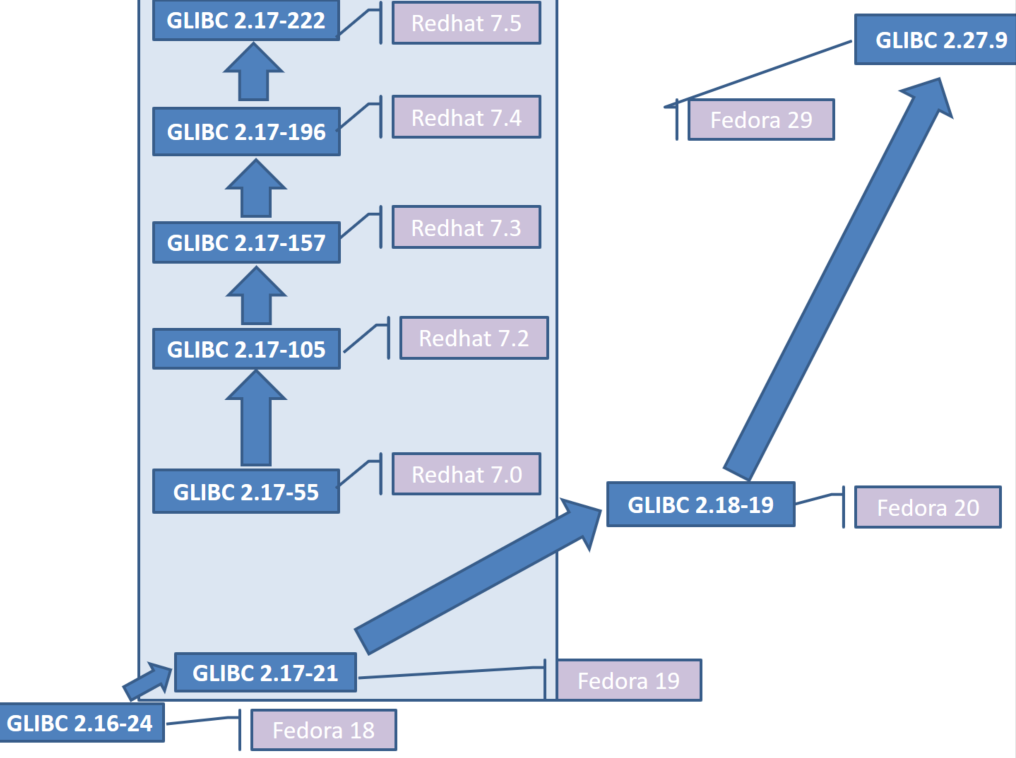
Thanks.
| Severity | Advisory | Summary | Release Date | RPM | OS | KSPLICE | GLIB | CVE |
|---|---|---|---|---|---|---|---|---|
| Important | ELSA-2018-4078 | glibc security update | 18/04/2018 | glibc-2.17-222.ksplice1.el7.x86_64.rpm | Oracle Linux 7.xx | YES | ||
| Moderate | ELSA-2018-0805 | glibc security, bug fix, and enhancement update | 16/04/2018 | glibc-2.17-222.el7.x86_64.rpm | Oracle Linux 7.5 | 2.17-222 | CVE-2014-9402 / CVE-2015-5180 / CVE-2017-12132 / CVE-2017-15670 / CVE-2017-15804 / CVE-2018-1000001 | |
| 01/02/2018 | GNU C Library | 2.27 | ||||||
| - | ELBA-2017-3296 | glibc bug fix update | 30/11/2017 | glibc-2.17-196.el7_4.2.x86_64.rpm | Oracle Linux 7.xx | |||
| Important | ELSA-2017-3601 | glibc security update | 09/08/2017 | glibc-2.17-196.ksplice1.el7.x86_64.rpm | Oracle Linux 7.xx | YES | ||
| Moderate | ELSA-2017-1916 | glibc security, bug fix, and enhancement update | 07/08/2017 | glibc-2.17-196.el7.x86_64.rpm | Oracle Linux 7.4 | 2.17-196 | CVE-2014-9761 / CVE-2015-8776 / CVE-2015-8778 / CVE-2015-8779 / CVE-2015-8777 | |
| 02/08/2017 | GNU C Library | 2.26 | ||||||
| - | ELBA-2017-3594 | glibc bug fix update | 17/07/2017 | glibc-2.17-157.ksplice1.el7_3.5.x86_64.rpm | Oracle Linux 7.xx | YES | ||
| - | ELBA-2017-1752 | glibc bug fix update | 14/07/2017 | glibc-2.17-157.el7_3.5.x86_64.rpm | Oracle Linux 7.xx | |||
| Important | ELSA-2017-3582 | glibc security update | 20/06/2017 | glibc-2.17-157.ksplice1.el7_3.4.x86_64.rpm | Oracle Linux 7.xx | YES | CVE-2017-1000364 | |
| Important | ELSA-2017-1481 | glibc security update | 19/06/2017 | glibc-2.17-157.el7_3.4.x86_64.rpm | Oracle Linux 7.xx | CVE-2017-1000366 | ||
| - | ELBA-2017-3577 | glibc bug fix update | 30/05/2017 | glibc-2.17-157.ksplice1.el7_3.2.x86_64.rpm | Oracle Linux 7.xx | YES | ||
| - | ELBA-2017-1302 | glibc bug fix update | 26/05/2017 | glibc-2.17-157.el7_3.2.x86_64.rpm | Oracle Linux 7.xx | |||
| 05/02/2017 | GNU C Library | 2.25 | ||||||
| - | ELBA-2016-3649 | glibc bug fix update | 08/12/2016 | glibc-2.17-157.ksplice1.el7_3.1.x86_64.rpm | Oracle Linux 7.xx | YES | ||
| - | ELBA-2016-2861 | glibc bug fix update | 06/12/2016 | glibc-2.17-157.el7_3.1.x86_64.rpm | Oracle Linux 7.xx | |||
| Low | ELSA-2016-2573 | glibc security, bug fix, and enhancement update | 09/11/2016 | glibc-2.17-157.el7.x86_64.rpm | Oracle Linux 7.3 | 2.17-157 | CVE-2016-3075 / CVE-2015-7547 / CVE-2015-5229 | |
| Low | ELSA-2016-3638 | glibc security update | 09/11/2016 | glibc-2.17-157.ksplice1.el7.x86_64.rpm | Oracle Linux 7.xx | YES | 2.17-157 | CVE-2016-3075 |
| 05/08/2016 | GNU C Library | 2.24 | ||||||
| - | ELBA-2016-1449 | glibc bug fix update | 02/08/2016 | glibc-2.17-106.0.1.el7_2.8.x86_64.rpm | Oracle Linux 7.xx | |||
| - | ELBA-2016-3590 | glibc bug fix update | 02/08/2016 | glibc-2.17-106.0.1.ksplice1.el7_2.8.x86_64.rpm | Oracle Linux 7.xx | YES | ||
| - | ELBA-2016-3562 | glibc bug fix update | 17/05/2016 | glibc-2.17-106.0.1.ksplice1.el7_2.6.x86_64.rpm | Oracle Linux 7.xx | YES | ||
| - | ELBA-2016-1030 | glibc bug fix update | 12/05/2016 | glibc-2.17-106.0.1.el7_2.6.x86_64.rpm | Oracle Linux 7.xx | |||
| 19/02/2016 | GNU C Library | 2.23 | ||||||
| Critical | ELSA-2016-3515 | glibc security update | 16/02/2016 | glibc-2.17-106.0.1.ksplice1.el7_2.4.x86_64.rpm | Oracle Linux 7.xx | YES | ||
| Critical | ELSA-2016-0176 | glibc security and bug fix update | 16/02/2016 | glibc-2.17-106.0.1.el7_2.4.x86_64.rpm | Oracle Linux 7.xx | CVE-2015-7547 / CVE-2015-5229 | ||
| Important | ELSA-2015-2172 | glibc security update | 25/11/2015 | glibc-2.17-106.0.1.el7_2.1.x86_64.rpm | Oracle Linux 7.xx | 2.17-106 | CVE-2015-5277 | |
| Moderate | ELSA-2015-2199 | glibc security, bug fix, and enhancement update | 24/11/2015 | glibc-2.17-105.0.1.el7.x86_64.rpm | Oracle Linux 7.2 | 2.17-105 | CVE-2013-7423 / CVE-2015-1781 / CVE-2015-1472 / CVE-2015-1473 | |
| 14/08/2015 | GNU C Library | 2.22 | ||||||
| Moderate | ELSA-2015-0327 | glibc security and bug fix update | 09/03/2015 | glibc-2.17-78.0.1.el7.x86_64.rpm | Oracle Linux 7.1 | 2.17-78 | CVE-2014-6040 / CVE-2014-8121 | |
| 06/02/2015 | GNU C Library | 2.21 | ||||||
| Critical | ELSA-2015-0092 | glibc security update | 27/01/2015 | glibc-2.17-55.0.4.el7_0.5.x86_64.rpm | Oracle Linux 7.xx | CVE-2015-0235 | ||
| Moderate | ELSA-2014-2023 | glibc security and bug fix update | 18/12/2014 | glibc-2.17-55.0.4.el7_0.3.x86_64.rpm | Oracle Linux 7.xx | CVE-2014-7817 | ||
| Important | ELSA-2014-1110 | glibc security update | 29/08/2014 | glibc-2.17-55.0.4.el7_0.1.x86_64.rpm | Oracle Linux 7.xx | CVE-2014-5119 / CVE-2014-0475 | ||
| 07/09/2014 | GNU C Library | 2.20 | ||||||
| - | ELBA-2014-3051 | glibc bug fix update | 29/07/2014 | glibc-2.17-55.0.4.el7.x86_64.rpm | Oracle Linux 7.0 | 2.17-55 | ||
| 08/02/2014 | GNU C Library | 2.19 | ||||||
| 12/08/2013 | GNU C Library | 2.18 | ||||||
| 25/02/2012 | GNU C Library | 2.17 |
Attention ceci est mon brouillon avant de faire une belle documentation sur Docker (il y a à boire et à manger).
Fort de mon expérience du premier POST ( https://www.cyber-neurones.org/2016/04/docker-les-premiers-pas/ ), je vais refaire une installation. J’ai pu voir qu’il me fallait 16 Go pour le “mkfs.btrfs” et j’ai vu que l’installation faisait 2 Go. Je vais donc garder 2 Go de plus, ce qui fait que je vais donc faire une installation à 20 Go.
Jusqu’à présent la limite était dû à ce paramètre du noyau:
Il fallait donc modifier le kernel avec la commande suivante :
ou encore :
La règle de calcul étant : shmmax = 250 Ko + 8.2 Ko * shared_buffers + 14.2 Ko * max_connections.
Autre information, la commande suivante permet de voir le nombre de connexion en temps réel : “SELECT * FROM pg_catalog.pg_stat_activity;”





