
J’ai voulu suivre la procédure avec brew, pip, …. mais sans succès avec la version 2.7.2
$ python --version
Python 2.7.2
J’avais des erreurs du type :
$ brew reinstall python....xcrun: error: invalid active developer path (/Library/Developer/CommandLineTools), missing xcrun at: /Library/Developer/CommandLineTools/usr/bin/xcrun Error: An exception occurred within a child process: CompilerSelectionError: python cannot be built with any available compilers. Install GNU's GCC brew install gcc$ python -m pip install --user requests /Library/Frameworks/Python.framework/Versions/2.7/Resources/Python.app/Contents/MacOS/Python: No module named pip$ sudo easy_install pip Searching for pip Reading http://pypi.python.org/simple/pip/ Couldn't find index page for 'pip' (maybe misspelled?) Scanning index of all packages (this may take a while) Reading http://pypi.python.org/simple/ No local packages or download links found for pip Best match: None Traceback (most recent call last): File "/Library/Frameworks/Python.framework/Versions/2.7/bin/easy_install", line 8, in <module> load_entry_point('setuptools==0.6c11', 'console_scripts', 'easy_install')() File "/Library/Frameworks/Python.framework/Versions/2.7/lib/python2.7/site-packages/setuptools-0.6c11-py2.7.egg/setuptools/command/easy_install.py", line 1712, in main File "/Library/Frameworks/Python.framework/Versions/2.7/lib/python2.7/site-packages/setuptools-0.6c11-py2.7.egg/setuptools/command/easy_install.py", line 1700, in with_ei_usage File "/Library/Frameworks/Python.framework/Versions/2.7/lib/python2.7/site-packages/setuptools-0.6c11-py2.7.egg/setuptools/command/easy_install.py", line 1716, in <lambda> File "/Library/Frameworks/Python.framework/Versions/2.7/lib/python2.7/distutils/core.py", line 152, in setup dist.run_commands() File "/Library/Frameworks/Python.framework/Versions/2.7/lib/python2.7/distutils/dist.py", line 953, in run_commands self.run_command(cmd) File "/Library/Frameworks/Python.framework/Versions/2.7/lib/python2.7/distutils/dist.py", line 972, in run_command cmd_obj.run() File "/Library/Frameworks/Python.framework/Versions/2.7/lib/python2.7/site-packages/setuptools-0.6c11-py2.7.egg/setuptools/command/easy_install.py", line 211, in run File "/Library/Frameworks/Python.framework/Versions/2.7/lib/python2.7/site-packages/setuptools-0.6c11-py2.7.egg/setuptools/command/easy_install.py", line 434, in easy_install File "/Library/Frameworks/Python.framework/Versions/2.7/lib/python2.7/site-packages/setuptools-0.6c11-py2.7.egg/setuptools/package_index.py", line 475, in fetch_distribution AttributeError: 'NoneType' object has no attribute 'clone' J’ai donc changé de fusil d’épaule :
(See the finale release : https://www.cyber-neurones.org/2019/02/diaro-app-pixel-crater-ltd-diarobackup-xml-how-to-migrate-data-to-joplin/ )
Step 1: Add in first ligne : before in file DiaroBackup.xml … it’s mandatory !
I use REST API to insert in JOPLIN : https://joplin.cozic.net/api/ , it’s good documentation.
Here my first release in Python to import data from Diaro App Backup to Joplin API :
#
# Version 1
#
#   ARIAS Frederic
#   Sorry ... It's difficult for me the python :)

from urllib2 import unquote
from lxml import etree
import os
from time import gmtime, strftime
import time

strftime("%Y-%m-%d %H:%M:%S", gmtime())
start = time.time()

print("Start : Parse Table")
tree = etree.parse("./DiaroBackup.xml")
for table in tree.xpath("/data/table"):
    print(table.get("name"))
print("End : Parse Table")

#Token
ip = "127.0.0.1"
port = "41184"
#token = "ABCD123ABCD123ABCD123ABCD123ABCD123"
token = "blablabla"
cmd = 'curl http://'+ip+':'+port+'/notes?token='+token
print cmd
os.system(cmd)

#Init
Diaro_UID = "12345678901234567801234567890123"
Lat = {}
Lng = {}
Lat[""] = ""
Lng[""] = ""
cmd = 'curl --data \'{ "id": "'+Diaro_UID+'", "title": "Diaro Import"}\' http://'+ip+':'+port+'/folders?token='+token
print cmd
os.system(cmd)

print("Start : Parse Table")
tree = etree.parse("./DiaroBackup.xml")
for table in tree.iter('table'):
    name = table.attrib.get('name')
    print name
    myorder = 1
    for r in table.iter('r'):
         myuid = ""
         mytitle = ""
         mylat = ""
         mylng = ""
         mytags = ""
         mydate = ""
         mytext = ""
         myfilename = ""
         myfolder_uid = Diaro_UID
         mylocation_uid = ""
         myprimary_photo_uid = ""
         myentry_uid = ""
         myorder += 1
         for subelem in r:
	     print(subelem.tag)
             if (subelem.tag == 'uid'):
                 myuid = subelem.text
              	 print ("myuid",myuid)
             if (subelem.tag == 'entry_uid'):
                 myentry_uid = subelem.text
                 print ("myentry_uid",myentry_uid)
             if (subelem.tag == 'primary_photo_uid'):
                 myprimary_photo_uid = subelem.text
                 print ("myprimary_photo_uid",myprimary_photo_uid)
             if (subelem.tag == 'folder_uid'):
                 myfolder_uid = subelem.text
                 print ("myfolder_uid",myfolder_uid)
             if (subelem.tag == 'location_uid'):
                 mylocation_uid = subelem.text
                 print ("mylocation_uid",mylocation_uid)
             if (subelem.tag == 'date'):
                 mydate = subelem.text
                 print ("mydate",mydate)
             if (subelem.tag == 'title'):
                 mytitle = subelem.text
                 print ("mytitle",mytitle)
		 print type(mytitle)
                 if type(mytitle) == unicode:
			mytitle = mytitle.encode('utf8')
             if (subelem.tag == 'lat'):
                 mylat = subelem.text
                 print ("mylat",mylat)
             if (subelem.tag == 'lng'):
                 mylng = subelem.text
                 print ("mylng",mylng)
             if (subelem.tag == 'tags'):
                 mytags = subelem.text
                 if mytags:
                    mytags[1:]
                 print ("mytags",mytags)
             if (subelem.tag == 'text'):
                 mytext = subelem.text
                 print ("mytext",mytext)
                 if type(mytext) == unicode:
                        mytext = mytext.encode('utf8')
             if (subelem.tag == 'filename'):
                 myfilename = subelem.text
                 print ("myfilename",myfilename)
         if (name == 'diaro_folders'):
              cmd = 'curl --data \'{ "id": "'+myuid+'", "title": "'+mytitle+'", "parent_id": "'+Diaro_UID+'"}\' http://'+ip+':'+port+'/folders?token='+token
              print cmd
              os.system(cmd)
         if (name == 'diaro_tags'):
              cmd = 'curl --data \'{ "id": "'+myuid+'", "title": "'+mytitle+'"}\' http://'+ip+':'+port+'/tags?token='+token
              print cmd
              os.system(cmd)
         if (name == 'diaro_attachments'):
              cmd = 'curl -F \'data=@media/photo/'+myfilename+'\'  -F \'props={"id":"'+myuid+'"}\' http://'+ip+':'+port+'/resources?token='+token
              print cmd
              os.system(cmd)
              cmd = 'curl -X PUT http://'+ip+':'+port+'/resources/'+myuid+'/notes/'+myentry_uid+'?token='+token
              print cmd
              os.system(cmd)
         if (name == 'diaro_locations'):
              Lat[myuid] = mylat
              Lng[myuid] = mylng
         if (name == 'diaro_entries'):
             if not mytext:
                  mytext = ""
             if not myfolder_uid:
                  myfolder_uid = Diaro_UID
             if not mytags:
                  mytags = ""
             if not mylocation_uid:
                  mylocation_uid = ""
             mytext = mytext.replace("'", "")
             mytitle = mytitle.replace("'", "")
             mytext = mytext.strip("\'")
             mytitle = mytitle.strip("\'")
             mytext = mytext.strip('(')
             mytitle = mytitle.strip('(')
             print type(mytext)
             cmd = 'curl --data \'{"latitude":"'+Lat[mylocation_uid]+'","longitude":"'+Lng[mylocation_uid]+'","tags":"'+mytags+'","parent_id":"'+myfolder_uid+'","id":"'+myuid+'","title":"'+mytitle+'", "created_time": "'+mydate+'", "body": "'+mytext+'"}\' http://'+ip+':'+port+'/notes?token='+token
             print cmd
             os.system(cmd)
print("End : Parse Table")

strftime("%Y-%m-%d %H:%M:%S", gmtime())
done = time.time()
elapsed = done - start
print(elapsed)
But I don’t understand the API, I can force the id ( for exemple : 12345678901234567801234567890123 ):
J’ai essayé :
A noter qu’il est possible de mettre neo4j sur un Raspberry : https://gist.github.com/widged/8329039 . Il me faut faire le test …
Je voulais tester le concept de Graph ( Node ….) sur ma base d’email … mais pour l’instant c’est un échec.
Misère.
Jupyter, c’est programmation et rédaction sur une même page. C’est vraiment très bien !
La documentation officielle : http://jupyter.readthedocs.io/en/latest/install.html .
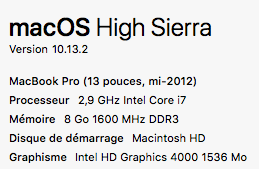
Mon OSX : Version 10.13.2 (17C88). ( A noter : Le MacBook est de mi-2012 et on est en 2017 … bonne espérance de vie. Pour rappel, la vrai date d’utilisation est dans Logiciel -> Installation )
Il est possible de faire l’Etape n°1 ou l’Etape n°1 bis (avec Anaconda).
L’étape n°1 : Installation de Python :





