

Pour l’installation de OSMC voir : https://www.cyber-neurones.org/2016/09/installation-un-media-center-avec-osmc-sur-un-raspberry-pi-3-model-b/ . “Installation un media-center avec OSMC sur un Raspberry Pi 3 Model B” ( fait le 30/09/2016) .
Je fais ce tutoriel suite à la corruption d’une carte SD sur mon raspberry.
Lire les articles :
- http://www.magdiblog.fr/divers/comment-prolonger-la-duree-de-vie-de-vos-cartes-sd-sur-raspberry-pi/ : Comment prolonger la durée de vie de vos cartes SD sur Raspberry Pi (màj)
- https://easydomoticz.com/forum/viewtopic.php?t=5867 : Longevité carte SD - Taux d’écriture et config sur RPi
- http://hardware-libre.fr/2014/03/raspberry-pi-et-corruption-de-carte-sd/ : Raspberry Pi et corruption de carte SD .
- https://www.raspberrypi.org/forums/viewtopic.php?t=199414 : microSD vs. USB flash vs. SSD
Première étape : Connexion SSH sur OSMC, il suffit de regarder dans les paramètres pour trouver l’IP : .
Ensuite on fait un ssh sur l’IP avec le login osmc et le mot de passe osmc :
$ ssh osmc@192.168.0.28
osmc@192.168.0.28's password:
The programs included with the Debian GNU/Linux system are free software;
the exact distribution terms for each program are described in the
individual files in /usr/share/doc/*/copyright.
Debian GNU/Linux comes with ABSOLUTELY NO WARRANTY, to the extent
permitted by applicable law.
Updating APT cache. Please be patient.
Generating locales (this might take a while)...
  fr_FR.UTF-8... done
Generation complete.
osmc@osmc:~$
On commence par une mise à jours :
osmc@osmc:~$ sudo apt-get update
osmc@osmc:~$ df -h
Sys. de fichiers Taille Utilisé Dispo Uti% Monté sur
devtmpfs           362M       0  362M   0% /dev
tmpfs              367M     19M  348M   6% /run
/dev/mmcblk0p2      29G    2,1G   26G   8% /
tmpfs              367M       0  367M   0% /dev/shm
tmpfs              5,0M       0  5,0M   0% /run/lock
tmpfs              367M       0  367M   0% /sys/fs/cgroup
/dev/mmcblk0p1     240M     22M  219M   9% /boot
tmpfs               74M       0   74M   0% /run/user/1000
root@osmc:~# lsblk
NAME        MAJ:MIN RM   SIZE RO TYPE MOUNTPOINT
sda           8:0    0 111,8G  0 disk
mmcblk0     179:0    0  29,7G  0 disk
├─mmcblk0p1 179:1    0   243M  0 part /boot
└─mmcblk0p2 179:2    0  29,5G  0 part /
root@osmc:~# sudo apt install rsync
....
root@osmc:~# sudo fdisk /dev/sda

Welcome to fdisk (util-linux 2.25.2).
Changes will remain in memory only, until you decide to write them.
Be careful before using the write command.

Device does not contain a recognized partition table.
Created a new DOS disklabel with disk identifier 0x64f9ca91.

Command (m for help): p
Disk /dev/sda: 111,8 GiB, 120034123776 bytes, 234441648 sectors
Units: sectors of 1 * 512 = 512 bytes
Sector size (logical/physical): 512 bytes / 512 bytes
I/O size (minimum/optimal): 512 bytes / 512 bytes
Disklabel type: dos
Disk identifier: 0x64f9ca91

Command (m for help): d
No partition is defined yet!
Could not delete partition 1995033425

Command (m for help): w

The partition table has been altered.
Calling ioctl() to re-read partition table.
Syncing disks.

root@osmc:~# sudo fdisk /dev/sda

Welcome to fdisk (util-linux 2.25.2).
Changes will remain in memory only, until you decide to write them.
Be careful before using the write command.

Device does not contain a recognized partition table.
Created a new DOS disklabel with disk identifier 0x7ac27f0a.

Command (m for help): n
Partition type
   p   primary (0 primary, 0 extended, 4 free)
   e   extended (container for logical partitions)
Select (default p): p
Partition number (1-4, default 1): 1
First sector (2048-234441647, default 2048):
Last sector, +sectors or +size{K,M,G,T,P} (2048-234441647, default 234441647):

Created a new partition 1 of type 'Linux' and of size 111,8 GiB.

Command (m for help): w
The partition table has been altered.
Calling ioctl() to re-read partition table.
Syncing disks.

root@osmc:~# sudo mke2fs -t ext4 -L rootfs /dev/sda1
mke2fs 1.42.12 (29-Aug-2014)
En train de créer un système de fichiers avec 29304950 4k blocs et 7331840 i-noeuds.
UUID de système de fichiers=c8478b72-fcaf-4dc7-87a7-5156cc19efab
Superblocs de secours stockés sur les blocs :
	32768, 98304, 163840, 229376, 294912, 819200, 884736, 1605632, 2654208,
	4096000, 7962624, 11239424, 20480000, 23887872

Allocation des tables de groupe : complété
Écriture des tables d'i-noeuds : complété
Création du journal (32768 blocs) : complété
Écriture des superblocs et de l'information de comptabilité du système de
fichiers : complété

root@osmc:~# sudo mount /dev/sda1 /mnt

--> Arrêt de tous les services, pour avoir la liste : root@osmc:~# service --status-all

root@osmc:~# sudo rsync -avx / /mnt
sending incremental file list
...
--> 6 heures de copie !
...
sent 1,258,978,550 bytes  received 742,144 bytes  91,619.38 bytes/sec
total size is 2,002,639,532  speedup is 1.59
...

..
osmc@osmc:~$ df -h
Sys. de fichiers Taille Utilisé Dispo Uti% Monté sur
devtmpfs           362M       0  362M   0% /dev
tmpfs              367M     38M  330M  11% /run
/dev/mmcblk0p2      29G    2,2G   26G   8% /
tmpfs              367M       0  367M   0% /dev/shm
tmpfs              5,0M       0  5,0M   0% /run/lock
tmpfs              367M       0  367M   0% /sys/fs/cgroup
/dev/mmcblk0p1     240M     22M  219M   9% /boot
/dev/sda1          110G    2,2G  103G   3% /mnt
tmpfs               74M       0   74M   0% /run/user/1000
osmc@osmc:~$ sudo cp /boot/cmdline.txt /boot/cmdline.txt.orig
osmc@osmc:~$ cat /boot/cmdline.txt
root=/dev/mmcblk0p2 rootfstype=ext4 rootwait quiet osmcdev=rbp2

osmc@osmc:~$ sudo vi /boot/cmdline.txt
osmc@osmc:~$ cat /boot/cmdline.txt
root=/dev/sda1 rootfstype=ext4 rootwait quiet osmcdev=rbp2

osmc@osmc:~$ cat /mnt/etc/fstab
/dev/mmcblk0p1  /boot    vfat     defaults,noatime    0   0
/dev/sda1       /       ext4      defaults,noatime    0   0
/dev/mmcblk0p2  /old    ext4      defaults,noatime    0   0
Quelques statistiques sur le disque SSD & la SD Card (avant le reboot):
root@osmc:~# sudo apt-get install sysstat
osmc@osmc:~$ iostat -k
Linux 4.4.16-4-osmc (osmc) 	20/09/2018 	_armv7l_	(4 CPU)

avg-cpu:  %user   %nice %system %iowait  %steal   %idle
           4,73    2,27    0,97   25,61    0,00   66,42

Device:            tps    kB_read/s    kB_wrtn/s    kB_read    kB_wrtn
mmcblk0          10,11       546,62        64,26   50417993    5927146
sda               0,36         0,27        31,21      24977    2879036

osmc@osmc:~$ iostat -m
Linux 4.4.16-4-osmc (osmc) 	20/09/2018 	_armv7l_	(4 CPU)

avg-cpu:  %user   %nice %system %iowait  %steal   %idle
           4,74    2,26    0,97   25,60    0,00   66,42

Device:            tps    MB_read/s    MB_wrtn/s    MB_read    MB_wrtn
mmcblk0          10,10         0,53         0,06      49236       5788
sda               0,36         0,00         0,03         24       2815
Après le reboot :
osmc@osmc:~$ df -h
Sys. de fichiers Taille Utilisé Dispo Uti% Monté sur
devtmpfs           362M       0  362M   0% /dev
tmpfs              367M    5,0M  362M   2% /run
/dev/sda1          110G    2,2G  103G   3% /
tmpfs              367M       0  367M   0% /dev/shm
tmpfs              5,0M       0  5,0M   0% /run/lock
tmpfs              367M       0  367M   0% /sys/fs/cgroup
/dev/mmcblk0p1     240M     22M  219M   9% /boot
/dev/mmcblk0p2      29G    2,2G   26G   8% /old
tmpfs               74M       0   74M   0% /run/user/1000
osmc@osmc:~$ lsblk
NAME        MAJ:MIN RM   SIZE RO TYPE MOUNTPOINT
sda           8:0    0 111,8G  0 disk
└─sda1        8:1    0 111,8G  0 part /
mmcblk0     179:0    0  29,7G  0 disk
├─mmcblk0p1 179:1    0   243M  0 part /boot
└─mmcblk0p2 179:2    0  29,5G  0 part /old
Voici l’activité de la carte SD et du disque SSD :
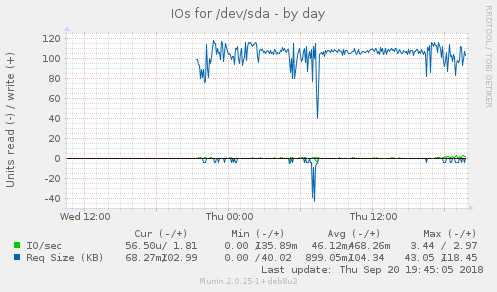
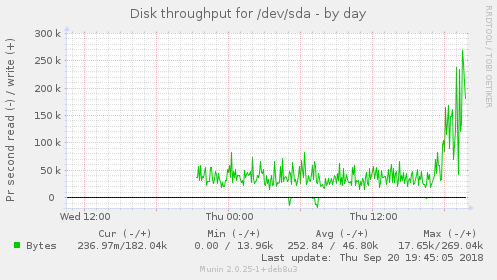
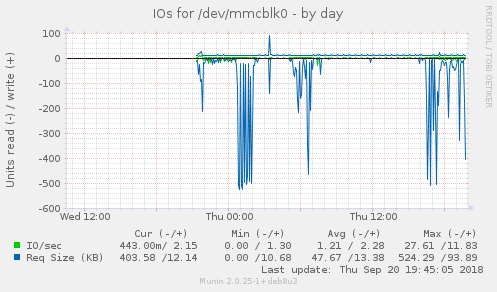
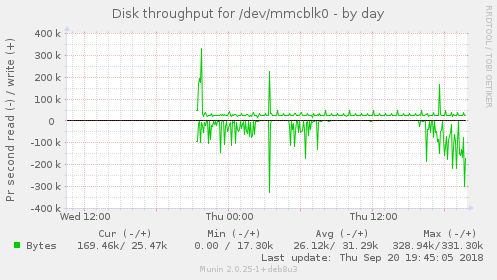
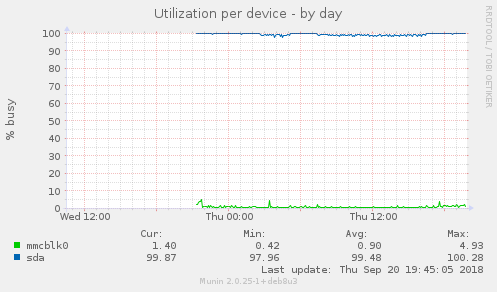
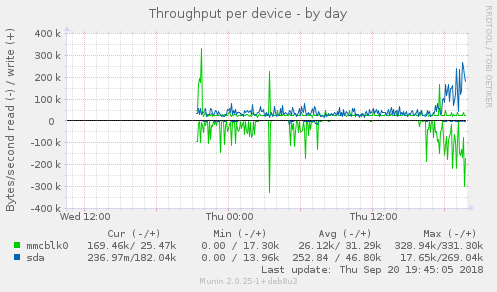
Le disque SSD est très lent via l’USB. Misère.