
J’étais présent sur les 2 jours de l’Open Source Experience, beaucoup de sujet à voir :
Bref j’y étais.
Pour plus d’information :
J’ai fini par réussir à augmenter la partition sous un VM Debian 11 ( sous Proxmox ) mais je suis jamais 100% sur de moi. J’oubli souvent la commande partprobe qui permet la confirmation du changement.
Avec la fin de Windows 10, je vois des nouvelles distributions de Linux :
Pour ma part, je suis toujours sous :
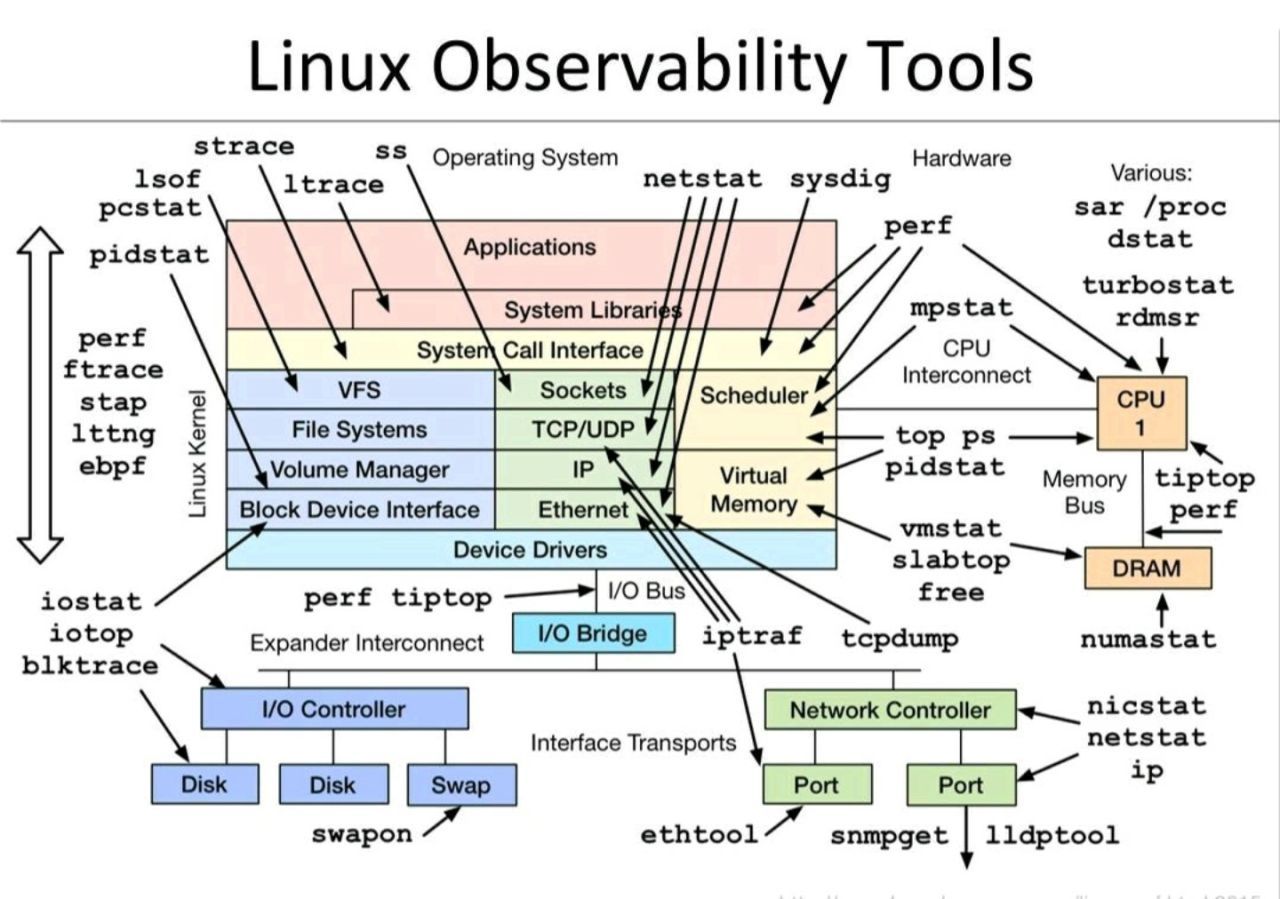 Mes preférés : lsof, strace, netstat, tcpdump, top.
Je viens de lire l’article : https://www.bleepingcomputer.com/news/security/new-stealthy-linux-malware-used-to-backdoor-systems-for-years/
Command-and-control servers historically used by the malware have domains registered six years ago, in December 2015, all of them
| FileName | MD5 | Detection | First Seen in VT |
|---|---|---|---|
| systemd-daemon | 1d45cd2c1283f927940c099b8fab593b | 0/61 | 2018-05-16 04:22:59 |
| systemd-daemon | 11ad1e9b74b144d564825d65d7fb37d6 | 0/58 | 2018-12-25 08:02:05 |
| systemd-daemon | 5c0f375e92f551e8f2321b141c15c48f | 0/56 | 2020-05-08 05:50:06 |
| gvfsd-helper | 64f6cfe44ba08b0babdd3904233c4857 | 0/61 | 2021-01-18 13:13:19 |
J’ai donc rapidement fait :
# sudo find / -name 'systemd-daemon'
# sudo find / -name 'gvfsd-helper'
Aucun n’est présent …
Sous Mac OS j’avais fait plusieurs articles …Mais sous Ubuntu c’est plus simple, voici les commandes que j’utilise :
$ du -sh Images/
$ find Images/ -iname '*.jpg' -exec mogrify \{} -verbose -resize 1920x1080\> \{} \;
$
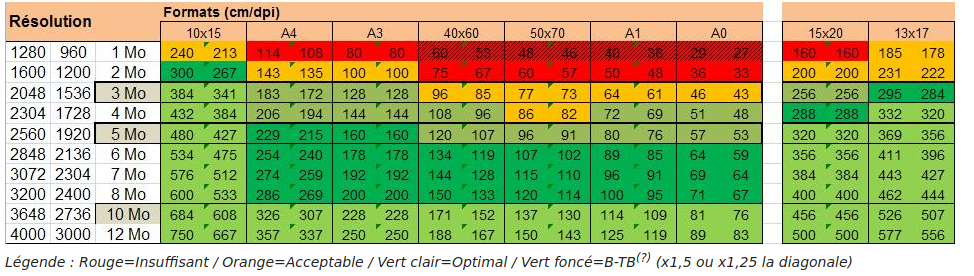
Je considère que la résolution max est 1920x1080 (on peut aussi prendre 2048x1536). Il est vivement conseillé d’avoir un backup avant de lancer les commandes. Et je vous conseille cette lecture : https://fr.wikipedia.org/wiki/Impression_photo_num%C3%A9rique
 A noter aussi que je déplace toutes les vidéos avant de lancer la commandes :
My current issue on Oracle Linux 7.3 (kernel 4.1.12-61.1.18): I have only one processor or issue “Unsupported PM cap regs version (7)”. Impossible to boot without issue “Unsupported PM cap regs version (7)” and 8 processors.
To see the number of processor : cat /proc/cpuinfo | grep “model name”
My processor is : Intel(R) Xeon(R) CPU E5-2623 v3 @ 3.00GHz
All my test done :
| Tests | Status | Processor | Note | Grub parameter |
|---|---|---|---|---|
| 1 | OK | 1 | quiet splash noapic nolapic acpi=off | |
| 2 | OK | 1 | quiet acpi=off | |
| 3 | KO | Freeze : Unsupported PM cap regs version (7) | quiet | |
| 4 | KO | No boot | quiet splash pci=noacpi | |
| 5 | KO | Freeze : Unsupported PM cap regs version (7) | quiet acpi=off nr_cpus=8 | |
| 6 | KO | Freeze : Unsupported PM cap regs version (7) | quiet acpi=ht | |
| 7 | KO | Freeze : Unsupported PM cap regs version (7) | quiet acpi=noirq | |
| 8 | KO | Freeze : Unsupported PM cap regs version (7) | quiet pnpacpi=off | |
| 9 | KO | Freeze : Unsupported PM cap regs version (7) | quiet pcie_aspm=off | |
| 10 | KO | Freeze : Unsupported PM cap regs version (7) | quiet pci=noacpi | |
| 11 | KO | Freeze : Unsupported PM cap regs version (7) | quiet acpi=ht nolapic splash | |
| 12 | KO | Freeze : Unsupported PM cap regs version (7) | quiet acpi=ht pci=nocrs | |
| 13 | KO | Freeze : Unsupported PM cap regs version (7) | quiet acpi=ht acpi_osi=Linux | |
| 14 | OK | 1 | quiet idle=poll acpi=off | |
| 15 | OK | 1 | quiet idle=poll acpi=off processor.nocst=1 | |
| 16 | OK | 1 | quiet acpi=off processor.nocst=1 | |
| 17 | KO | Freeze : Unsupported PM cap regs version (7) | quiet acpi=ht acpi.nopower_check=1 acpi_osi=Linux | |
| 18 | OK | 1 | quiet acpi=off processor.nocst=1 maxcpus=8 | |
| 19 | OK | 1 | quiet intel_iommu=on acpi=off noapi | |
| 20 | KO | Freeze : Unsupported PM cap regs version (7) | quiet noapic pci=assign-busses apicmaintimer idle=poll reboot=cold,hard | |
| 21 | KO | Freeze : Unsupported PM cap regs version (7) | quiet pci=nomsi | |
| 22 | KO | Freeze : Unsupported PM cap regs version (7) | quiet pci=noaer | |
| 23 | KO | Freeze : Unsupported PM cap regs version (7) | quiet splash noapic nolapic acpi=ht pci=nocrs | |
| 24 | KO | Freeze : Unsupported PM cap regs version (7) | quiet splash noapic nolapic acpi=noirq pci=nocrs | |
| 25 | KO | Freeze : Unsupported PM cap regs version (7) | quiet splash nomodeset acpi_osi=Linux |
When I see the source code of pci.c :
On a beaucoup parlé de :
Nouveau pour moi et à suivre:
Les dernières informations suite à mon précédent post : https://www.cyber-neurones.org/2017/05/wannacry-nouvelle-grosse-faille-de-securite-sous-windows/ .


Maintenant il va falloir attendre lundi matin pour voir l’ampleur exacte des dégâts : https://intel.malwaretech.com/botnet/wcrypt/?t=1h&bid=all 
 En résumé en France, d’un coté on à le FSB qui nous fait des fake news “Macron Leaks”:
Il est très important de faire les mise à jours Windows ( https://technet.microsoft.com/en-us/library/security/ms17-010.aspx ) et de désactiver SMB ( Panneau de config -> Programmes -> Activer désactiver fonctionnalités -> Décocher support de partage de fichiers SMB ) :

L’autres solutions est de bloquer les ports : 135, 137, 138, 139, 445, 1900. Mais c’est pas le mieux.
Vous pouvez aussi vérifier ce répertoire :

Si vous lisez bien l’anglais, voici le lien Microsoft sur l’attaque :





