
J’ai eu l’erreur : “server reached pm.max_children setting (5), consider raising it” dans les fichiers de logs /var/log/php7.2-fpm.log.
Mes fichiers de logs pour Nextcloud ( configuration via NGinx ) :
- /var/log/php7.2-fpm.log : PHP . - /var/log/nginx/nextcloud.error & /var/log/nginx/nextcloud.access : NGINX . - /var/log/nextcloud.log : Nextcloud. - /usr/share/nginx/nextcloud/data/nextcloud.log : Nextcloud. - /usr/share/nginx/nextcloud/data/audit.log : Nextcloud. - /usr/share/nginx/nextcloud/data/updater.log : Nextcloud.
Pour supprimer l’erreur j’ai modifié le fichier de configuration :
# cat /etc/php/7.2/fpm/pool.d/www.conf | grep -v "^;" | grep -v "^$"
[www]
user = www-data
group = www-data
listen = /run/php/php7.2-fpm.sock
listen.owner = www-data
listen.group = www-data
pm = dynamic
pm.max_children = 50
pm.start_servers = 10
pm.min_spare_servers = 5
pm.max_spare_servers = 10
env[PATH] = /usr/local/bin:/usr/bin:/bin
Je suis donc passé de 5 à 50 … je pense que le problème ne devrait plus apparaitre.
Pour supprimer ce type d’erreur :
[error] 2239#2239: *454376 access forbidden by rule, client: 127.0.0.1, server: 127.0.0.1, request: "GET /data/.ocdata?t=1591823240128 HTTP/1.1", host: "127.0.0.1"J’ai modifié la configuration de NGINX. Sur les fichiers /etc/nginx/conf.d/nextcloud-local.conf & /etc/nginx/conf.d/nextcloud.conf . J’ai ajouté :
    location = /data/htaccesstest.txt {
    allow all;
    log_not_found off;
    access_log off;
    }
    location = /data/\.ocdata {
    access_log off;
    }
Pour relancer :
systemctl restart nginx.serviceJ’ai choisit de mettre dans le fichier de configuration : /usr/share/nginx/nextcloud/config/config.php
'memcache.local' => '\OC\Memcache\APCu',Pour que cela fonctionne il faut installer la bonne librairie en PHP :
$ sudo apt-get install php-apcu
...
$ sudo systemctl restart php7.2-fpm.serviceQuand on a l’erreur “504 Gateway Time-out’ … le mieux est de faire avec les lignes de commandes :
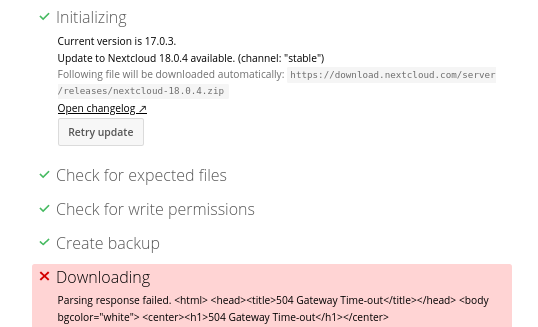
$ sudo -u www-data php /usr/share/nginx/nextcloud/updater/updater.phar
Nextcloud Updater - version: v16.0.3-3-ga0c2b25 dirty

Current version is 18.0.4.

Update to Nextcloud 18.0.4 available. (channel: "stable")
Following file will be downloaded automatically: https://download.nextcloud.com/server/releases/nextcloud-18.0.4.zip
Open changelog ↗

Steps that will be executed:
[✔] Check for expected files
[✔] Check for write permissions
[✔] Create backup
[✔] Downloading
[✔] Verify integrity
[✔] Extracting
[✔] Enable maintenance mode
[✔] Replace entry points
[✔] Delete old files
[✔] Move new files in place
[✔] Done

Continue update? [y/N] y

Info: Pressing Ctrl-C will finish the currently running step and then stops the updater.

[✔] Check for expected files
[✔] Check for write permissions
[✔] Create backup
[✔] Downloading
[✔] Verify integrity
[✔] Extracting
[✔] Enable maintenance mode
[✔] Replace entry points
[✔] Delete old files
[✔] Move new files in place
[✔] Done

Update of code successful.

Should the "occ upgrade" command be executed? [Y/n] Y
Nextcloud or one of the apps require upgrade - only a limited number of commands are available
You may use your browser or the occ upgrade command to do the upgrade
2020-06-01T19:21:53+02:00 Set log level to debug
....
$ sudo -u www-data php /usr/share/nginx/nextcloud/occ maintenance:mode --off
Maintenance mode disabledJ’ai eu l’erreur : Table ‘nextcloud.oc_external_mounts’ doesn’t exist , pour fixer le problème j’ai fait :
Pour avoir l’erreur j’ai modifié le fichier /usr/share/nginx/nextcloud/config/config.php :
  'installed' => true,
  'maintenance' => false,
  'theme' => '',
  'debug' => true,
  'loglevel' => '2',
  'logtimezone' => 'Europe/Paris',
  'log_type' => 'owncloud',
  'logfile' => '/var/log/nextcloud.log',
  'log_rotate_size' => '104857600',
Pour le fix du problème :
$ sudo -u www-data php /usr/share/nginx/nextcloud/occ maintenance:repair
...
$ sudo -u www-data php /usr/share/nginx/nextcloud/occ upgrade
Nextcloud is already latest version
$ sudo -u www-data php /usr/share/nginx/nextcloud/occ  app:enable files_external
files_external enabled
$ sudo -u www-data php /usr/share/nginx/nextcloud/occ upgrade
Nextcloud is already latest version
A noter que j’ai aussi modifier la configuration de PHP : /etc/php/7.2/fpm/php.ini
Les commandes pour l’installation :
$ sudo apt install flatpak
Lecture des listes de paquets... Fait
Construction de l'arbre des dépendances
Lecture des informations d'état... Fait
Les paquets supplémentaires suivants seront installés :
  libostree-1-1 xdg-desktop-portal xdg-desktop-portal-gtk
Les NOUVEAUX paquets suivants seront installés :
  flatpak libostree-1-1 xdg-desktop-portal xdg-desktop-portal-gtk
0 mis à jour, 4 nouvellement installés, 0 à enlever et 13 non mis à jour.
Il est nécessaire de prendre 1 313 ko dans les archives.
Après cette opération, 5 898 ko d'espace disque supplémentaires seront utilisés.
Souhaitez-vous continuer ? [O/n] O
...
$ flatpak remote-add --if-not-exists flathub https://flathub.org/repo/flathub.flatpakrepo

$ flatpak install flathub org.nextcloud.Nextcloud
Required runtime for org.nextcloud.Nextcloud/x86_64/stable (runtime/org.kde.Platform/x86_64/5.12) found in remote flathub
Do you want to install it? [y/n]: y
Installing in system:
org.kde.Platform/x86_64/5.12                       flathub 8337138165ca
org.freedesktop.Platform.VAAPI.Intel/x86_64/18.08  flathub 227f12933709
org.freedesktop.Platform.html5-codecs/x86_64/18.08 flathub b7006caaf6a7
org.kde.Platform.Locale/x86_64/5.12                flathub b76e501f9811
org.nextcloud.Nextcloud/x86_64/stable              flathub 4755c241adb7
  permissions: ipc, network, wayland, x11, dri
  file access: host, xdg-config/kdeglobals:ro, xdg-run/Nextcloud:create, xdg-run/dconf, ~/.config/dconf:ro
  dbus access: com.canonical.AppMenu.Registrar, org.freedesktop.Notifications, org.freedesktop.secrets, org.kde.StatusNotifierWatcher
org.nextcloud.Nextcloud.Locale/x86_64/stable       flathub f098e4785813
Is this ok [y/n]: y
Installing: org.kde.Platform/x86_64/5.12 from flathub
[####################] 1415 metadata, 27766 content objects fetched; 404772 KiB transferred in 128 seconds
Now at 8337138165ca.
Installing: org.freedesktop.Platform.VAAPI.Intel/x86_64/18.08 from flathub
[####################] 4 metadata, 2 content objects fetched; 1783 KiB transferred in 0 seconds
Now at 227f12933709.
Installing: org.freedesktop.Platform.html5-codecs/x86_64/18.08 from flathub
[####################] 22 metadata, 127 content objects fetched; 3111 KiB transferred in 1 seconds
Now at b7006caaf6a7.
Installing: org.kde.Platform.Locale/x86_64/5.12 from flathub
[####################] 33 metadata, 196 content objects fetched; 5085 KiB transferred in 1 seconds
Now at b76e501f9811.
Installing: org.nextcloud.Nextcloud/x86_64/stable from flathub
[####################] 78 metadata, 221 content objects fetched; 4049 KiB transferred in 2 seconds
Now at 4755c241adb7.
Installing: org.nextcloud.Nextcloud.Locale/x86_64/stable from flathub
[####################] 7 metadata, 2 content objects fetched; 5 KiB transferred in 0 seconds
Now at f098e4785813.

$ flatpak run org.nextcloud.Nextcloud
Gtk-Message: 14:04:44.389: Failed to load module "canberra-gtk-module"
Gtk-Message: 14:04:44.389: Failed to load module "canberra-gtk-module"
On a donc la fenetre suivante qui s’ouvre, et il suffit de faire la configuration :
Suite à la mise à jours de NextCloud, j’avais l’erreur suivante :
$ sudo tail -f /var/snap/nextcloud/current/apache/logs/php_errors.log

[01-Feb-2020 18:18:07 UTC] PHP Fatal error:  Declaration of OCA\Bookmarks_FullTextSearch\Provider\BookmarksProvider::getSearchTemplate(): OCP\FullTextSearch\Model\SearchTemplate must be compatible with OCP\FullTextSearch\IFullTextSearchProvider::getSearchTemplate(): OCP\FullTextSearch\Model\ISearchTemplate in /var/snap/nextcloud/18204/nextcloud/extra-apps/bookmarks_fulltextsearch/lib/Provider/BookmarksProvider.php on line 55
Voici ma version :
$ snap --version
snap    2.42.1+18.04
snapd   2.42.1+18.04
series  16
ubuntu  18.04
kernel  5.0.0-37-generic
$ snap list | grep nextcloud
nextcloud                16.0.7snap2                 18204  stable    nextcloud*             -
J’ai donc supprimé le plugin bookmarks_fulltextsearch, la méthode n’est pas propre mais efficace :
Présentation du Rock64 :
rock64@rock64:~$ df
Filesystem     1K-blocks    Used Available Use% Mounted on
udev             2007204       0   2007204   0% /dev
tmpfs             401844   10464    391380   3% /run
/dev/mmcblk1p7  61228716 2045964  56657512   4% /
tmpfs            2009204       0   2009204   0% /dev/shm
tmpfs               5120       4      5116   1% /run/lock
tmpfs            2009204       0   2009204   0% /sys/fs/cgroup
/dev/mmcblk1p6    114446     978    113468   1% /boot/efi
tmpfs             401840       0    401840   0% /run/user/1000

rock64@rock64:~$ uname -a
Linux rock64 4.4.132-1075-rockchip-ayufan-ga83beded8524 #1 SMP Thu Jul 26 08:22:22 UTC 2018 aarch64 GNU/Linux

rock64@rock64:~$ cat /etc/debian_version
9.9
Voici les quelques commandes …





