
Pour tester manuellement j’ai fait :
/usr/sbin/munin-run --debug mysql_
/usr/sbin/munin-run --debug mysql_isam_space_
j’ai pu voir qu’il me manquait des installations en Perl
apt-get install -y libcache-cache-perl
apt-get install libdbd-mysql-perl
apt-get install libgd-gd2-perl
apt-get install libgd-graph-perlPour faire suite : https://www.cyber-neurones.org/2018/09/raspberry-munin-les-premiers-graphiques-de-la-freebox/ .Raspberry : Munin : les premiers graphiques de la Freebox.
Voici les graphiques après un mois :
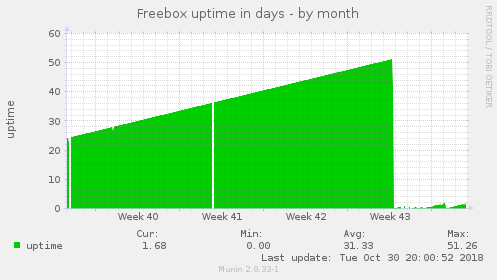
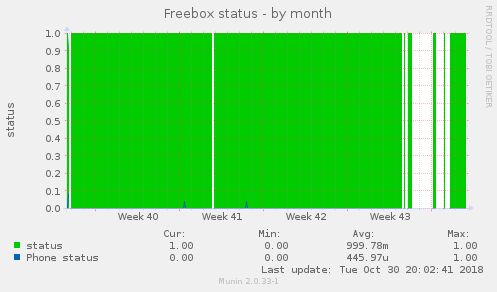
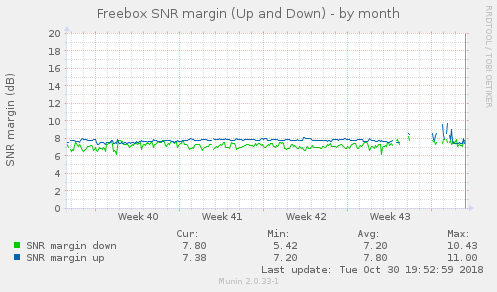
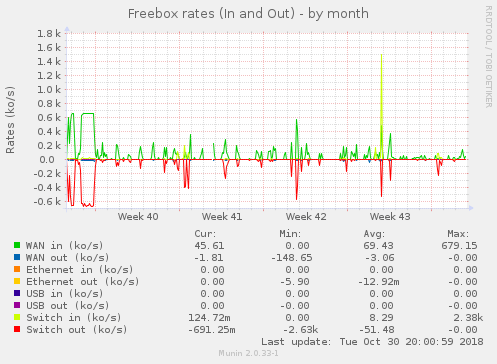
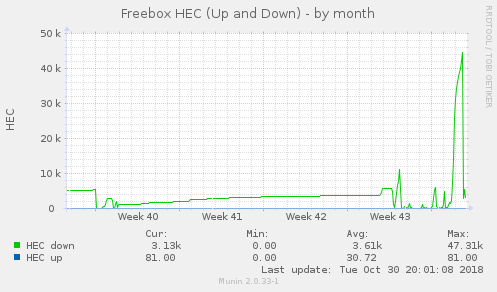
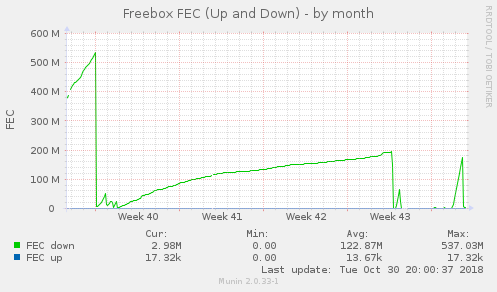
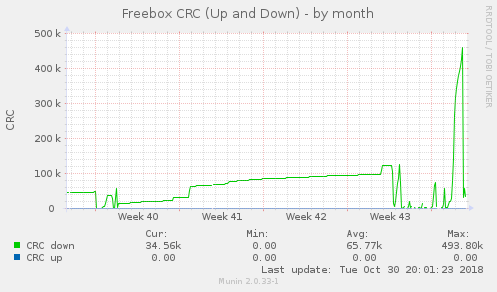
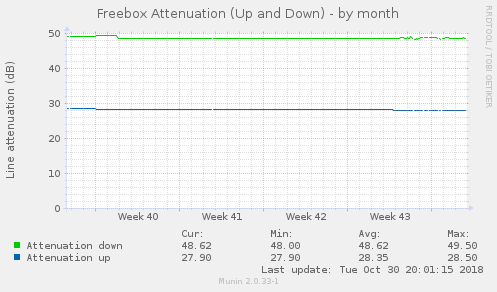
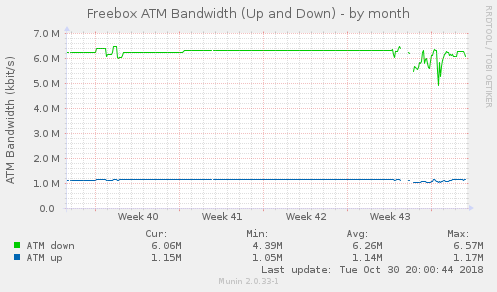
En ce moment, je suis en mode : Misère (il suffit de voir :Freebox status). Et comme toujours le support n’est pas joignable …
La première étape est de voir si le Bluetooth est bien lancé au démarrage :
$ dmesg | grep -i blue
[   11.903994] Bluetooth: Core ver 2.22
[   11.904056] Bluetooth: HCI device and connection manager initialized
[   11.904073] Bluetooth: HCI socket layer initialized
[   11.904080] Bluetooth: L2CAP socket layer initialized
[   11.904098] Bluetooth: SCO socket layer initialized
[   11.913494] Bluetooth: HCI UART driver ver 2.3
[   11.913506] Bluetooth: HCI UART protocol H4 registered
[   11.913509] Bluetooth: HCI UART protocol Three-wire (H5) registered
[   11.913652] Bluetooth: HCI UART protocol Broadcom registered
[   12.098214] Bluetooth: BNEP (Ethernet Emulation) ver 1.3
[   12.098223] Bluetooth: BNEP filters: protocol multicast
[   12.098245] Bluetooth: BNEP socket layer initialized

$ sudo systemctl status bluetooth*
● bluetooth.target - Bluetooth
   Loaded: loaded (/lib/systemd/system/bluetooth.target; static; vendor preset: enabled)
   Active: active since Tue 2018-10-09 16:17:10 UTC; 2 days ago
     Docs: man:systemd.special(7)

Warning: Journal has been rotated since unit was started. Log output is incomplete or unavailable.

● bluetooth.service - Bluetooth service
   Loaded: loaded (/lib/systemd/system/bluetooth.service; enabled; vendor preset: enabled)
   Active: active (running) since Tue 2018-10-09 16:17:10 UTC; 2 days ago
     Docs: man:bluetoothd(8)
 Main PID: 812 (bluetoothd)
   Status: "Running"
   CGroup: /system.slice/bluetooth.service
           └─812 /usr/lib/bluetooth/bluetoothd

Warning: Journal has been rotated since unit was started. Log output is incomplete or unavailable.
A noter pour que cela fonctionne bien j’ai du ajouter le service hciuart :
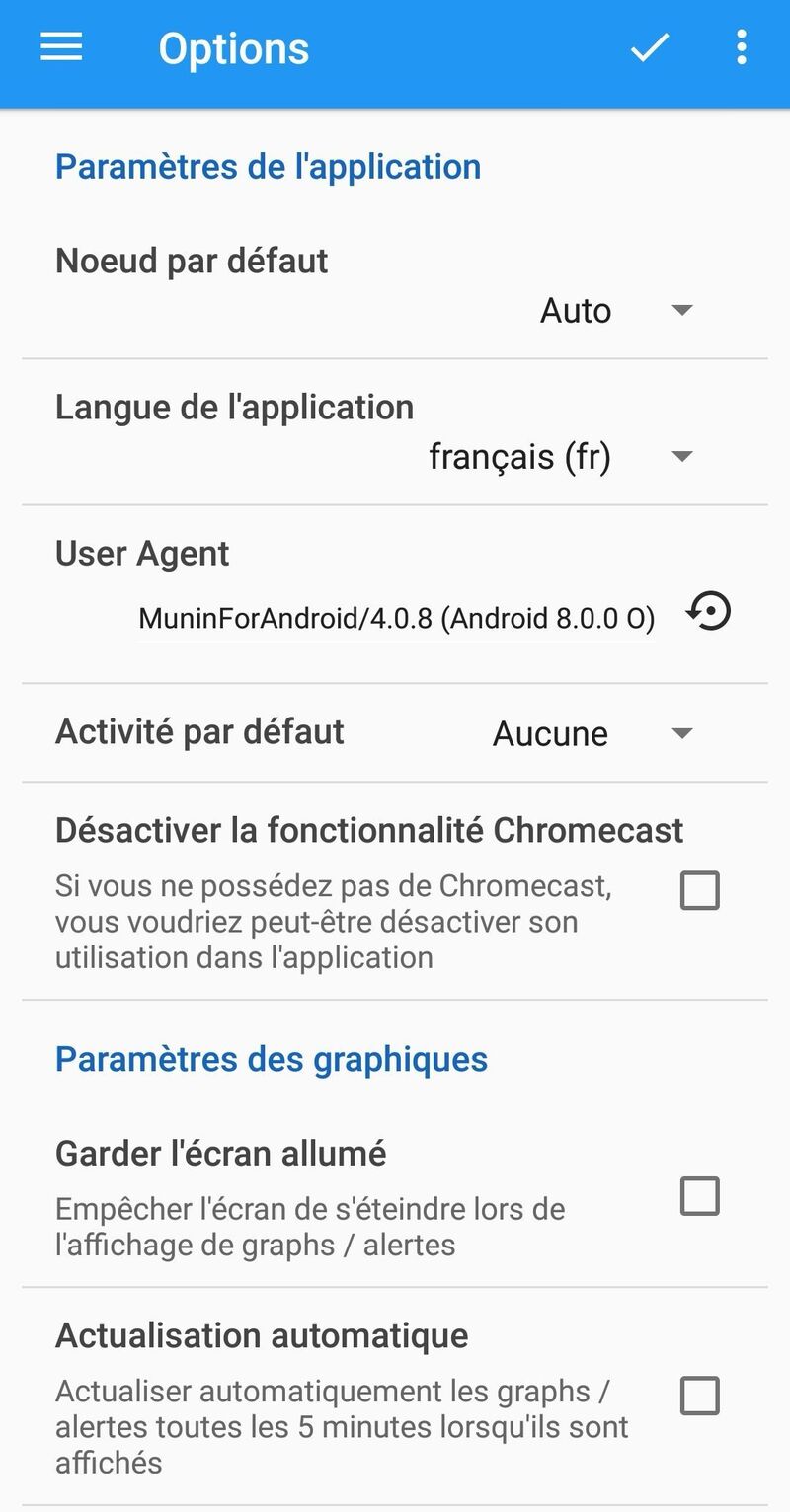
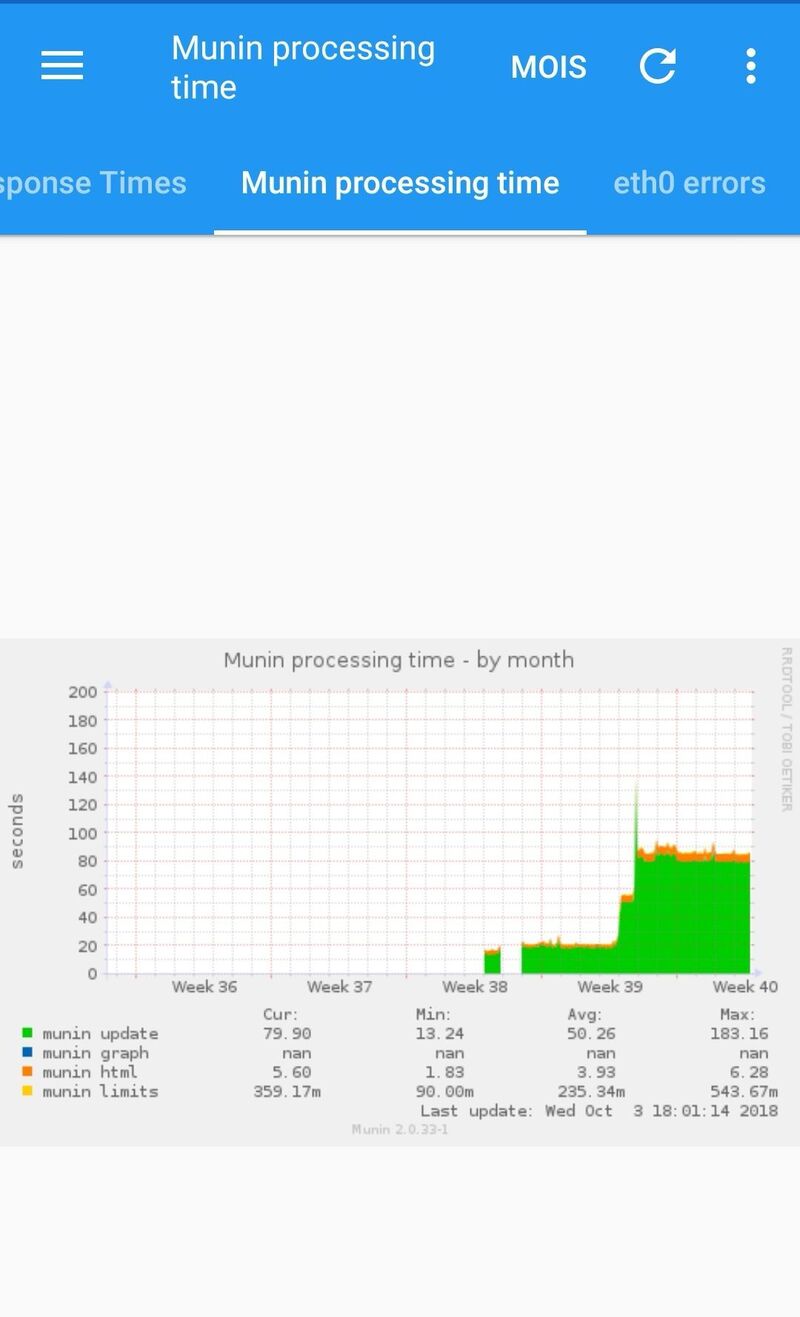
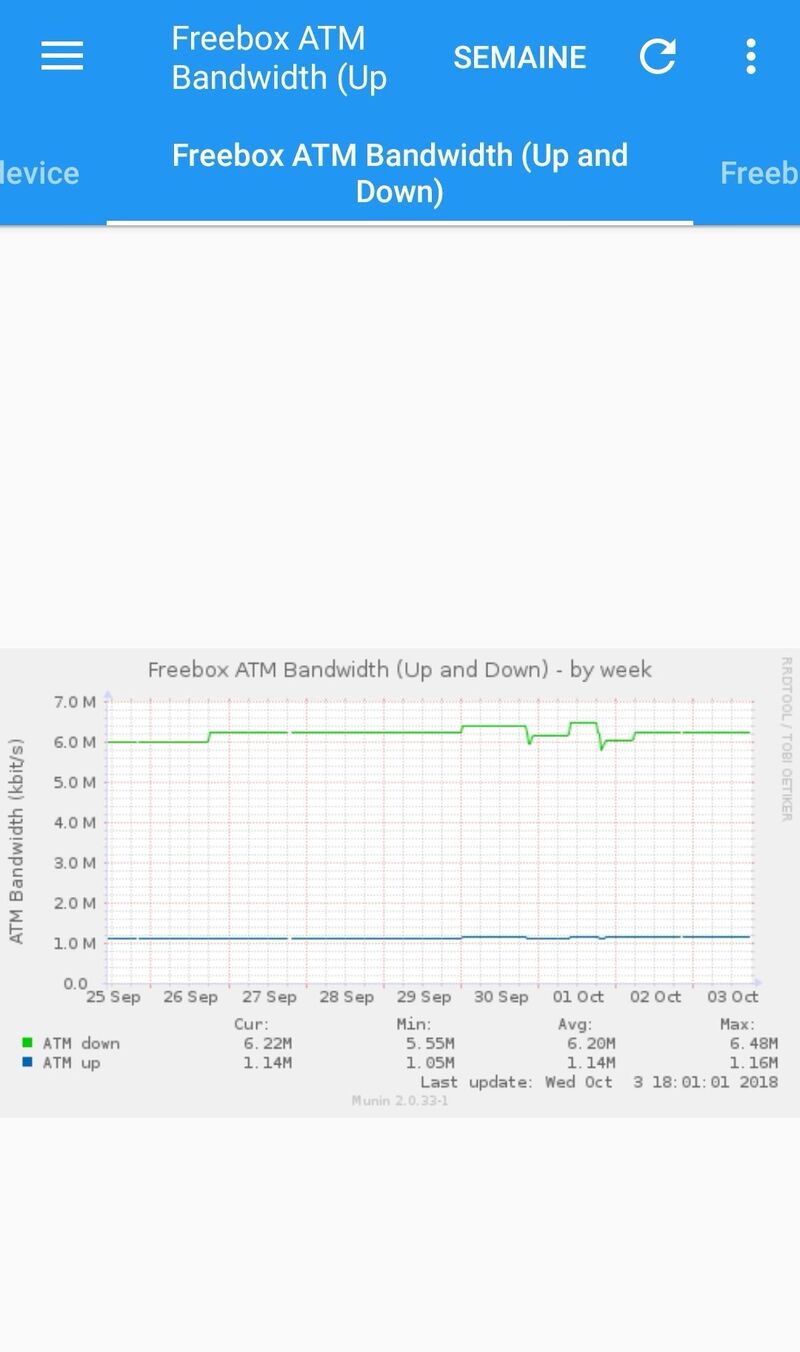
Voici le lien vers l’application : https://play.google.com/store/apps/details?id=com.chteuchteu.munin&hl=fr . J’ai du mal à voir la valeur ajouter si l’on compare avec un simple navigateur Web. Mais cela fonctionne ….
A suivre.
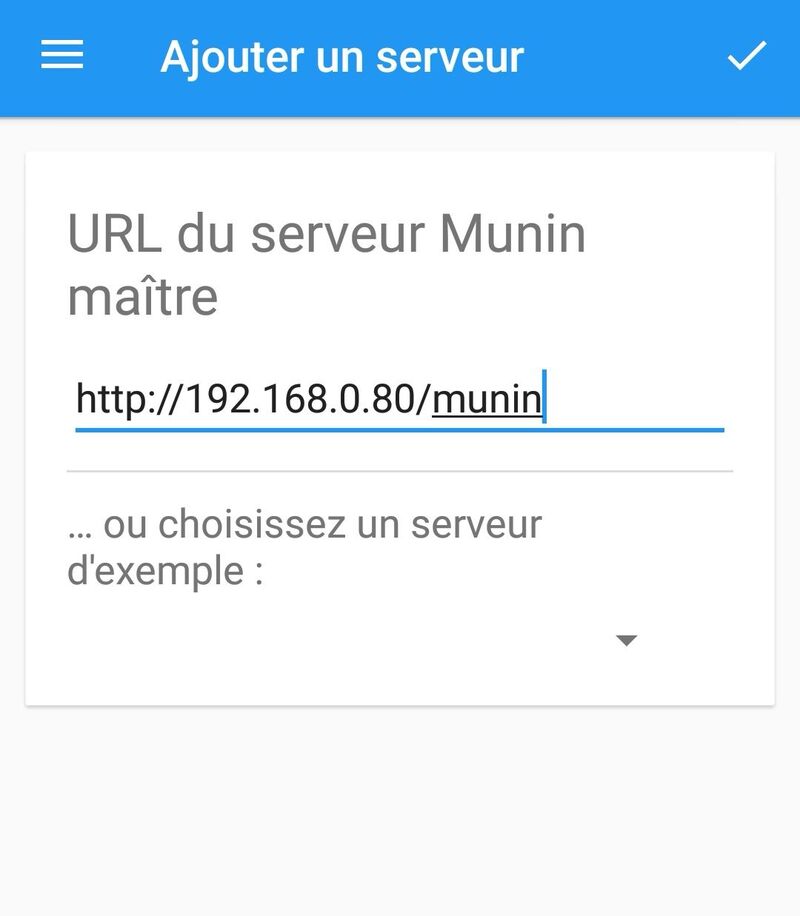
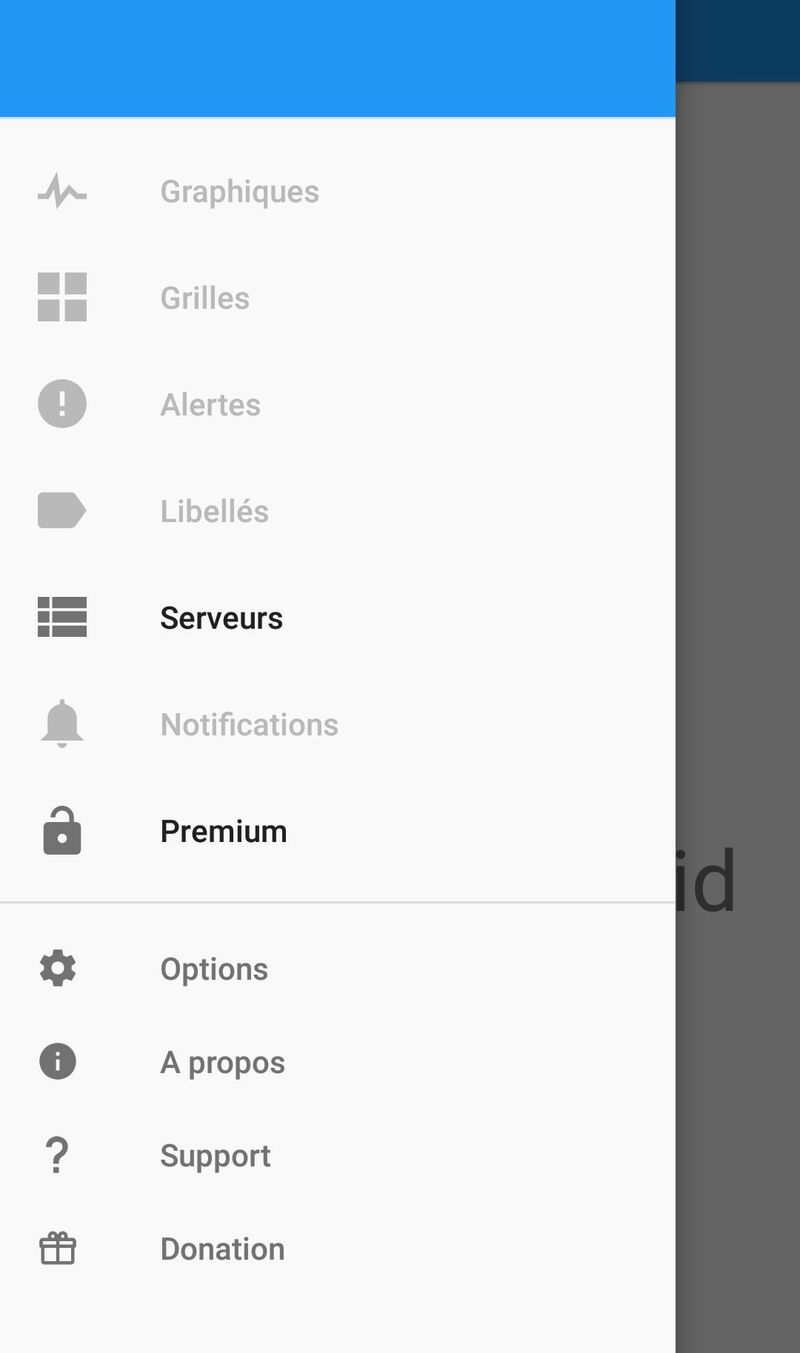

Quand je regarde les logs j’ai :
 Error output from irqstats:
     Argument "usb_fiq" isn't numeric in addition (+) at /etc/munin/plugins/irqstats line 95, <$in> line 18.
Le code en question qui pose problème :
sub sum (@) {
    my $sum = 0;
    $sum += $_ || 0 for @_;     # Avoid complaints about empty strings
    return $sum;
}
Je viens de voir qu’il y avait un fix : http://munin-monitoring.org/attachment/ticket/1462/munin-v2.0.6-raspberry_pi-irqstats-usb_fiq.patch fait le 01.04.2014 ?!
Ma configuration ( admin est le nom de mon serveur QNAP, son IP est dans /etc/hosts ) :
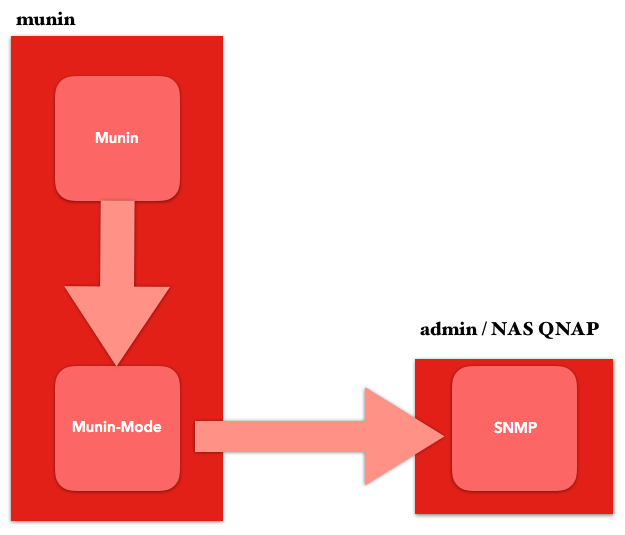
Les étapes :
osmc@osmc:~$ sudo apt-get install libnet-snmp-perl

osmc@osmc:~$ sudo apt-get install nmap

osmc@osmc:~$ sudo munin-node-configure --shell --snmp admin --snmpversion 2 --snmpcommunity QNAP
ln -s '/usr/share/munin/plugins/snmp__df' '/etc/munin/plugins/snmp_admin_df'
ln -s '/usr/share/munin/plugins/snmp__df_ram' '/etc/munin/plugins/snmp_admin_df_ram'
ln -s '/usr/share/munin/plugins/snmp__if_' '/etc/munin/plugins/snmp_admin_if_1'
ln -s '/usr/share/munin/plugins/snmp__if_' '/etc/munin/plugins/snmp_admin_if_3'
ln -s '/usr/share/munin/plugins/snmp__if_err_' '/etc/munin/plugins/snmp_admin_if_err_1'
ln -s '/usr/share/munin/plugins/snmp__if_err_' '/etc/munin/plugins/snmp_admin_if_err_3'
ln -s '/usr/share/munin/plugins/snmp__if_multi' '/etc/munin/plugins/snmp_admin_if_multi'
ln -s '/usr/share/munin/plugins/snmp__memory' '/etc/munin/plugins/snmp_admin_memory'
ln -s '/usr/share/munin/plugins/snmp__netstat' '/etc/munin/plugins/snmp_admin_netstat'
ln -s '/usr/share/munin/plugins/snmp__processes' '/etc/munin/plugins/snmp_admin_processes'
ln -s '/usr/share/munin/plugins/snmp__swap' '/etc/munin/plugins/snmp_admin_swap'
ln -s '/usr/share/munin/plugins/snmp__uptime' '/etc/munin/plugins/snmp_admin_uptime'
ln -s '/usr/share/munin/plugins/snmp__users' '/etc/munin/plugins/snmp_admin_users'
ln -s '/usr/share/munin/plugins/snmp__winload' '/etc/munin/plugins/snmp_admin_winload'
ln -s '/usr/share/munin/plugins/snmp__winmem' '/etc/munin/plugins/snmp_admin_winmem'

osmc@osmc:~$ sudo munin-node-configure --shell --snmp admin --snmpversion 2 --snmpcommunity QNAP | sudo sh

osmc@osmc:~$ sudo systemctl restart munin-node
On peut tester manuellement via un telnet :
( C’est instable … sniff )
Installation de Munin Server sur MacOS.
Le lien : https://www.macports.org/install.php pour le téléchargement : macOS High Sierra v10.13

Installation
# sudo port install munin +server
Password:
Warning: xcodebuild exists but failed to execute
Warning: Xcode does not appear to be installed; most ports will likely fail to build.
--->  Computing dependencies for munin
The following dependencies will be installed:
...
Continue? [Y/n]: Y
...
--->  Extracting munin
--->  Applying patches to munin
--->  Configuring munin
--->  Building munin
--->  Staging munin into destroot
###########################################################
# A startup item has been generated that will cause the
# Munin server to fetch data from all nodes every 5 mins.
# It is disabled by default, please execute the following
# command to enable:
#
# sudo launchctl load -w /Library/LaunchDaemons/org.macports.munin-cron.plist
###########################################################
--->  Creating launchd control script 'munin-node'
--->  Installing munin @1.4.7_6+server
--->  Activating munin @1.4.7_6+server
--->  Cleaning munin
--->  Updating database of binaries
--->  Updating database of C++ stdlib usage
--->  Scanning binaries for linking errors
--->  No broken files found.
--->  No broken ports found.
--->  Some of the ports you installed have notes:
  libidn has the following notes:
    Please be aware that GNU libidn2 is the successor of GNU libidn. It comes
    with IDNA 2008
    and TR46 implementations and also provides a compatibility layer for GNU
    libidn.
  munin has the following notes:
    To detect supported Munin plugins please use the following command:

    sudo -u munin munin-node-configure --suggest --shell | sudo sh

    A startup item has been generated that will aid in starting munin with
    launchd. It is disabled by default. Execute the following command to start
    it, and to cause it to launch at startup:

        sudo port load munin
  python27 has the following notes:
    To make this the default Python or Python 2 (i.e., the version run by the
    'python' or 'python2' commands), run one or both of:

        sudo port select --set python python27
        sudo port select --set python2 python27

# sudo port install munin
--->  Fetching distfiles for munin
--->  Verifying checksums for munin
--->  Extracting munin
--->  Applying patches to munin
--->  Configuring munin
--->  Building munin
--->  Staging munin into destroot
--->  Creating launchd control script 'munin-node'
--->  Installing munin @1.4.7_6
--->  Unloading startupitem 'munin-node' for munin
--->  Deactivating munin @1.4.7_6+server
--->  Cleaning munin
--->  Activating munin @1.4.7_6
--->  Cleaning munin
--->  Scanning binaries for linking errors
--->  No broken files found.
--->  No broken ports found.
--->  Some of the ports you installed have notes:
  munin has the following notes:
    To detect supported Munin plugins please use the following command:

    sudo -u munin munin-node-configure --suggest --shell | sudo sh

    A startup item has been generated that will aid in starting munin with launchd. It is disabled by default. Execute the following command to start
    it, and to cause it to launch at startup:

        sudo port load munin
# sudo -u munin munin-node-configure --suggest --shell
# The following plugins caused errors:
# apache_processes:
# 	Non-zero exit during autoconf (255)
# if_:
# 	Timed out during suggest
# 	No valid suggestions
# if_err_:
# 	Timed out during suggest
# 	No valid suggestions
# mysql_:
# 	Non-zero exit during autoconf (2)
# slony_lag_:
# 	Non-zero exit during autoconf (2)
# varnish_:
# 	Non-zero exit during autoconf (255)
Je supprime le –shell :
Installation d’un plugin en python : https://github.com/arthur-debert/munin-httpresponse-plugin/blob/master/httpresponsetime
$ sudo vi /usr/share/munin/plugins/httpresponsetime
 -> Copie du script.
$ sudo ln -s  /usr/share/munin/plugins/httpresponsetime /etc/munin/plugins/httpresponsetime
$ sudo chmod +x  /usr/share/munin/plugins/httpresponsetime /etc/munin/plugins/httpresponsetime
$ sudo apt-get install python-setuptools python-dev build-essential
$ sudo easy_install pip
$ sudo pip install httplib2
Ajout dans le fichier :
$ sudo vi /etc/munin/plugin-conf.d/munin-node
...
[httpresponsetime]
    env.urls https://www.cyber-neurones.org
...
Et on relance :
$ sudo munin-node-configure --shell
$ sudo service munin-node restart
Et voici le résultat :
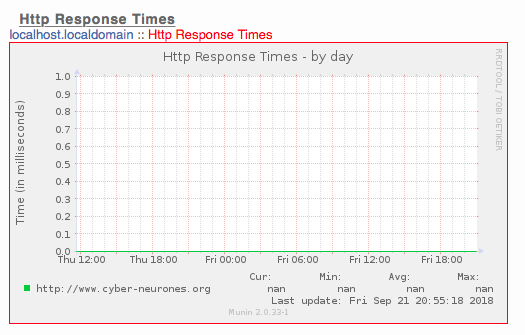
Après 24h ou Munin a fonctionné parfaitement, maintenant j’ai une erreur ?! Je pense qu’une mise à jours à casser Perl :
osmc@osmc:~$ sudo su - munin --shell=/bin/bash
munin@osmc:~$ munin-cron --debug
Can't load '/usr/lib/arm-linux-gnueabihf/perl5/5.20/auto/RRDs/RRDs.so' for module RRDs: libpng12.so.0: cannot open shared object file: No such file or directory at /usr/lib/arm-linux-gnueabihf/perl/5.20/DynaLoader.pm line 187.
 at /usr/share/perl5/Munin/Master/UpdateWorker.pm line 19.
Compilation failed in require at /usr/share/perl5/Munin/Master/UpdateWorker.pm line 19.
BEGIN failed--compilation aborted at /usr/share/perl5/Munin/Master/UpdateWorker.pm line 19.
Compilation failed in require at /usr/share/perl5/Munin/Master/Update.pm line 17.
BEGIN failed--compilation aborted at /usr/share/perl5/Munin/Master/Update.pm line 17.
Compilation failed in require at /usr/share/munin/munin-update line 14.
BEGIN failed--compilation aborted at /usr/share/munin/munin-update line 14.
A noter aussi que le ldconfig est un peu mal :
Suite à l’installation : https://www.cyber-neurones.org/2018/09/osmc-raspberry-installation-de-muni-node-et-apache2-avec-un-script-pour-freebox/ : OSMC/Raspberry : installation de munin ( et Apache2) avec un script pour Freebox :
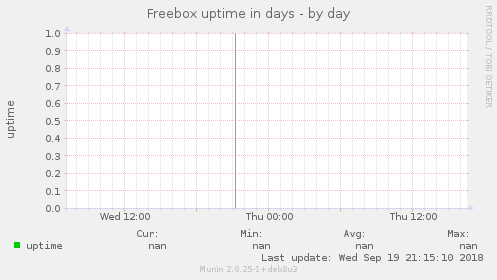
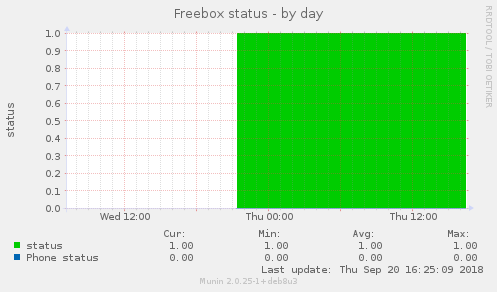
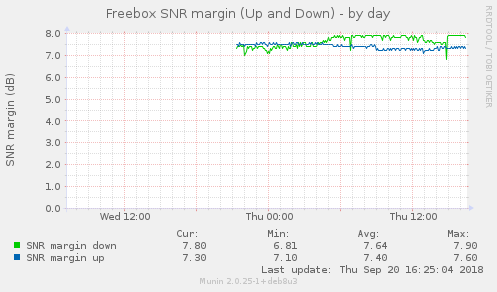
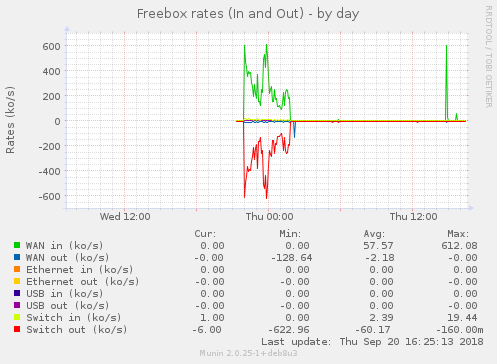
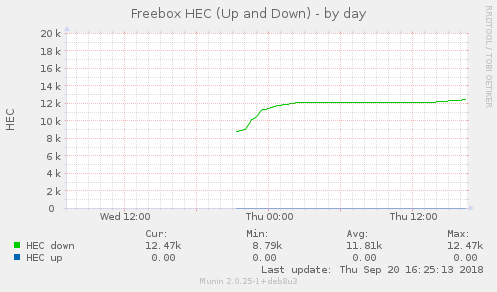
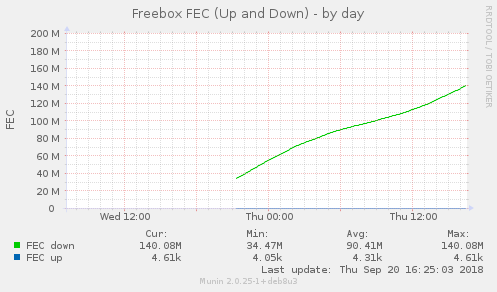
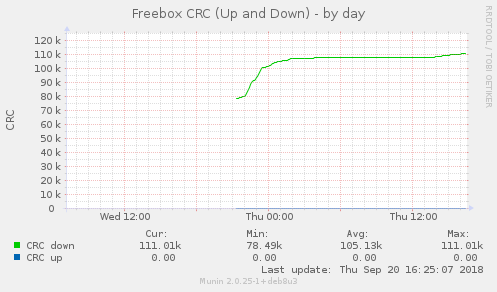
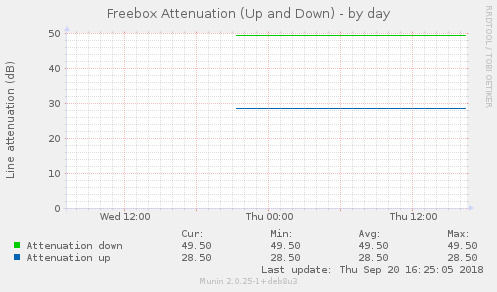
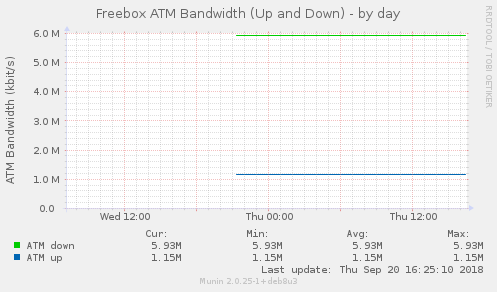
Maintenant je vais pouvoir prouver à Free la mauvaise qualité ….





