
C’est pas gagné pour faire la détection du contour du blob (en mv4) :
[video width=“1060” height=“720” m4v=“https://www.cyber-neurones.org/wp-content/uploads/2022/04/blob2outpytest.m4v"][/video]
J’ai des problèmes de jaune :(
import cv2
import numpy as np
import matplotlib.pyplot as plt
....
        frame_hsv=cv2.cvtColor(frame, cv2.COLOR_BGR2HSV)

        low_yellow=np.array([10, 125, 100])
        upper_yellow=np.array([60, 220, 220])
        mask_yellow=cv2.inRange(frame_hsv,low_yellow,upper_yellow)

        list_masks=[mask_yellow]
        for i,mask in enumerate(list_masks):

            contours, _=cv2.findContours(mask,cv2.RETR_LIST,cv2.CHAIN_APPROX_NONE)
Sans le polygone (et en mp4):
[video width=“1280” height=“720” mp4=“https://www.cyber-neurones.org/wp-content/uploads/2022/04/blob2outpytest2.mp4"][/video]
A suivre.
J’ai eu l’erreur suivante :
NVIDIA GeForce RTX 3060 Laptop GPU with CUDA capability sm_86 is not compatible with the current PyTorch installation.
The current PyTorch install supports CUDA capabilities sm_37 sm_50 sm_60 sm_70.
If you want to use the NVIDIA GeForce RTX 3060 Laptop GPU GPU with PyTorch, please check the instructions at https://pytorch.org/get-started/locally/
Pour fixer le problème j’ai fait:
pip3 install torch==1.9.0+cu111 torchvision==0.10.0+cu111 torchaudio==0.9.0 -f https://download.pytorch.org/whl/torch_stable.htmlVoici mon installation :
$ nvidia-smi
Sat Mar 12 13:00:45 2022
+-----------------------------------------------------------------------------+
| NVIDIA-SMI 470.103.01 Driver Version: 470.103.01 CUDA Version: 11.4 |
|-------------------------------+----------------------+----------------------+
| GPU Name Persistence-M| Bus-Id Disp.A | Volatile Uncorr. ECC |
| Fan Temp Perf Pwr:Usage/Cap| Memory-Usage | GPU-Util Compute M. |
| | | MIG M. |
|===============================+======================+======================|
| 0 NVIDIA GeForce ... Off | 00000000:01:00.0 On | N/A |
| N/A 42C P0 27W / N/A | 1053MiB / 5946MiB | 0% Default |
| | | N/A |
+-------------------------------+----------------------+----------------------+
+-----------------------------------------------------------------------------+
| Processes: |
| GPU GI CI PID Type Process name GPU Memory |
| ID ID Usage |
|=============================================================================|
| 0 N/A N/A 1616 G /usr/lib/xorg/Xorg 608MiB |
| 0 N/A N/A 3460 G budgie-wm 33MiB |
| 0 N/A N/A 3959 G ...AAAAAAAA== --shared-files 2MiB |
| 0 N/A N/A 4006 G ...AAAAAAAAA= --shared-files 60MiB |
| 0 N/A N/A 4221 G ...AAAAAAAAA= --shared-files 42MiB |
| 0 N/A N/A 4269 G ...AAAAAAAAA= --shared-files 15MiB |
| 0 N/A N/A 4584 G ...oud-3.4.2-x86_64.AppImage 2MiB |
| 0 N/A N/A 97021 G /usr/lib/firefox/firefox 148MiB |
| 0 N/A N/A 99523 G ...rbird/192/thunderbird-bin 96MiB |
| 0 N/A N/A 99893 G /usr/lib/firefox/firefox 2MiB |
| 0 N/A N/A 100617 G ...826642640911437010,131072 33MiB |
+-----------------------------------------------------------------------------+\Pour télécharger le fichier de l’étude : https://ec.europa.eu/newsroom/dae/redirection/document/79021 .
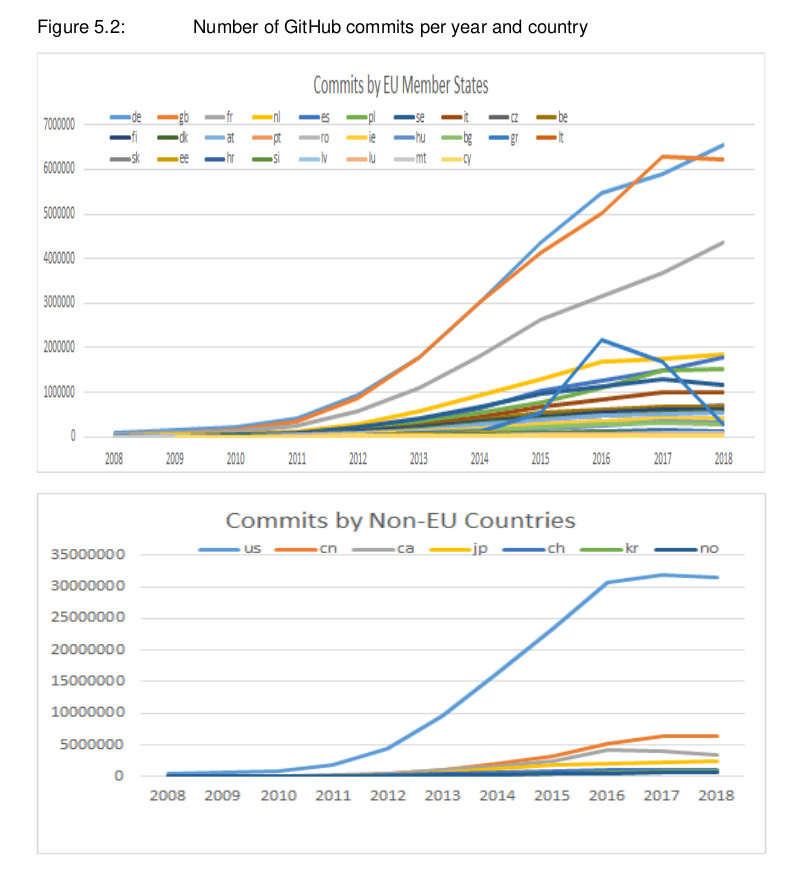
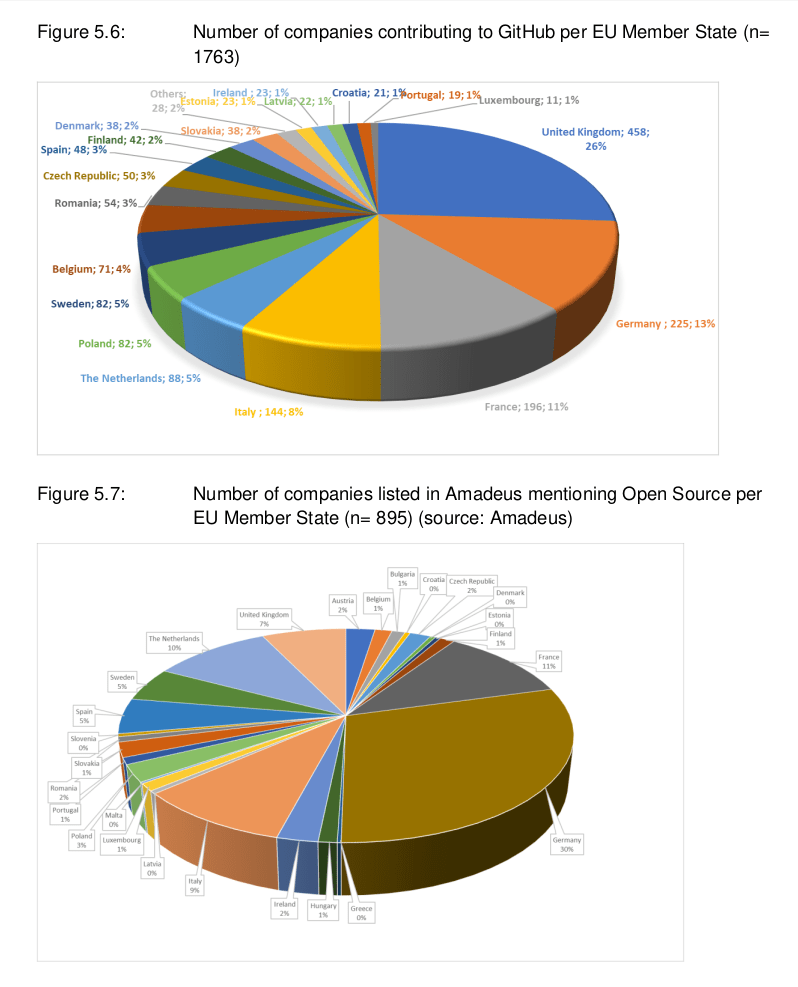
Je me note la commande :
gs -sDEVICE=pdfwrite -dCompatibilityLevel=1.4 -dPDFSETTINGS=/ebook -dNOPAUSE -dQUIET -dBATCH -dDetectDuplicateImages -dCompressFonts=true -r300 -sOutputFile=MonPDF_format_ebook.pdf MonPDF.pdf A noter que pour dPDFSETTINGS on peut mettre plus de qualité via :
Fin de mon mémo
La recherche sous ThunderBird ne fonctionne plus, il faut donc refaire les index.
# locate global-messages-db.sqlite | xargs du -h
1,2M	/home/XXXXX/.thunderbird/0ywo1rhk.default-beta/global-messages-db.sqlite
1,2M	/home/XXXXX/.thunderbird/b15soes8.default-release-1/global-messages-db.sqlite
1,2M	/home/XXXXX/.thunderbird/dqmb6p3g.default/global-messages-db.sqlite
1,2M	/home/XXXXX/.thunderbird/ea15798n.default-release/global-messages-db.sqlite
1,2M	/home/XXXXX/.thunderbird/g5f2xgbj.default-beta-1/global-messages-db.sqlite
1,2M	/home/XXXXX/.thunderbird/yk1r4599.farias/global-messages-db.sqlite
1,3G	/home/XXXXX/snap/thunderbird/common/.thunderbird/YYYYY.default/global-messages-db.sqlite
XXXXX => user. YYYYY => profile.
Ce qui est pénible c’est que thunderbird fait énormément de profil (à chaque gros update) ensuite pour trouver le bon fichier, je prends celui qui est > 1,2M.
Je stoppe thunderbird, je supprime le fichier (global-messages-db.sqlite) et je relance thunderbird qui refait le fichier index.
J’ai fait un petit script pour envoyer les logs vers Grafana :
mysql -u root -e "CREATE DATABASE TEAMS;"
mysql -u root -e "USE TEAMS;DROP TABLE TEAMS_AUDIT;"
mysql -u root -e "USE TEAMS; CREATE TABLE TEAMS_AUDIT (DATE datetime, duration float, vdiMode int, eventpdclevel int);"
echo "Version 1.0";
mysql -u root -e "USE TEAMS; DELETE FROM TEAMS_AUDIT";

grep "desktop_foreground_duration" ~/.config/Microsoft/Microsoft\ Teams/logs.txt ~/.config/Microsoft/Microsoft\ Teams/old_logs_* | sed 's/:/ /g' | awk '{print $6 "-" $4 "-" $5 " " $7 ":" $8 ":" $9 " " $20 " " $24 " " $26}' | sed 's/,/ /g' | sed 's/Jun/06/g' | sed 's/May/05/g' > /tmp/audit_teams.txt

while read line
do
DATE=$(echo $line | awk '{print $1 " " $2}');
DURATION=$(echo $line | awk '{print $3}');
VDI=$(echo $line | awk '{print $4}');
LEVEL=$(echo $line | awk '{print $5}');
SQL="USE TEAMS; INSERT INTO TEAMS_AUDIT (DATE, duration, vdiMode, eventpdclevel) VALUES ('$DATE',$DURATION,$VDI,$LEVEL);"
#echo $SQL
mysql -u root -e "$SQL"
done < /tmp/audit_teams.txt

echo "Done"
Ensuite sur Grafana il suffit de faire :
J’ai pu voir dans les logs ( .config/Microsoft/Microsoft Teams/logs/teams-startup.log ) l’erreur suivante :
MaxListenersExceededWarning: Possible EventEmitter memory leak detected. 11 appInitialized listeners added. Use emitter.setMaxListeners() to increase limitMa version de Node.js :
$ node -v
v10.21.0
La version de Teams : 1.3.00.5153 ( dans le fichier .config/Microsoft/Microsoft\ Teams/settings.json )
J’ai vu un article sur le sujet : https://www.stefanjudis.com/today-i-learned/nodejs-sends-warnings-when-you-add-too-many-listeners-to-an-event-emitter/ et j’ai donc l’impression que c’est uniquement via le code que l’on fixe le problème.
A suivre.
Le site officiel : https://gotify.net/ . Les sources du projet : https://github.com/gotify .
Voici les étapes de l’installation :
$ cd /opt/
$ sudo wget https://github.com/gotify/server/releases/download/v2.0.16/gotify-linux-amd64.zip
$ sudo unzip gotify-linux-amd64.zip
Archive:  gotify-linux-amd64.zip
  inflating: gotify-linux-amd64
  inflating: LICENSE
   creating: licenses/
$ sudo chmod +x gotify-linux-amd64
$ sudo mkdir /etc/gotify
$ sudo vi /etc/gotify/config.yml
server:
  listenaddr: "" # the address to bind on, leave empty to bind on all addresses
  port: 7070 # the port for the http server
$ sudo ./gotify-linux-amd64
Ensuite on se connecte :
Suite à la mise à jours de NextCloud, j’avais l’erreur suivante :
$ sudo tail -f /var/snap/nextcloud/current/apache/logs/php_errors.log

[01-Feb-2020 18:18:07 UTC] PHP Fatal error:  Declaration of OCA\Bookmarks_FullTextSearch\Provider\BookmarksProvider::getSearchTemplate(): OCP\FullTextSearch\Model\SearchTemplate must be compatible with OCP\FullTextSearch\IFullTextSearchProvider::getSearchTemplate(): OCP\FullTextSearch\Model\ISearchTemplate in /var/snap/nextcloud/18204/nextcloud/extra-apps/bookmarks_fulltextsearch/lib/Provider/BookmarksProvider.php on line 55
Voici ma version :
$ snap --version
snap    2.42.1+18.04
snapd   2.42.1+18.04
series  16
ubuntu  18.04
kernel  5.0.0-37-generic
$ snap list | grep nextcloud
nextcloud                16.0.7snap2                 18204  stable    nextcloud*             -
J’ai donc supprimé le plugin bookmarks_fulltextsearch, la méthode n’est pas propre mais efficace :
Petit résumé sur CPU Test avec sysbench :
| Result / PC | PI 3 | PI 4 | MacBook Air (11-inch Mid 2011) | TUXEDO InfinityBook Pro 14 v5 (2020) |
|---|---|---|---|---|
| events (avg/stddev) | 10000.0000/0.00 | 10000.0000/0.00 | 10000.0000/0.00 | 6629.0000/0.00 |
| execution time (avg/stddev) | 139.6552/0.00 | 92.7194/0.00 | 15.5460/0.00 | 9.9939/0.00 |
File IO Test:
| Result / PC | PI 3 | PI 4 | MacBook Air (11-inch Mid 2011) | TUXEDO InfinityBook Pro 14 v5 (2020) |
|---|---|---|---|---|
| events (avg/stddev) | 62565.0000/0.00 | 167527.0000/0.00 | ||
| execution time (avg/stddev) | 7.6081/0.00 | 9.9148/0.00 |





