
Suite de l’article : https://www.cyber-neurones.org/2018/10/munin-usb-temperature-via-lusb-ok-mais-sabstenir-si-on-nest-pas-developpeur/ : “Raspberry / Munin / USB : Température via l’USB : OK mais s’abstenir si on n’est pas développeur !”
Finalement j’ai fait un script bash pour une meilleure gestion :
$ cat /usr/share/munin/plugins/temper_x
#!/bin/sh
VCG=/usr/sbin/temperx
WARN=70
CRIT=75
if [ "$1" = "autoconf" ]; then
        if [ -x $VCG ]; then
                echo yes
                exit 0
        else
                echo no
                exit 1
        fi
elif [ "$1" = "config" ]; then
        echo "graph_title USB Temperature"
        echo "graph_args --base 1000"
        echo "graph_vlabel Celsius"
        echo "graph_category sensors"
        echo "graph_info Temperature with USB"
        echo "Temperature.label Temperature"
        echo "Temperature.type GAUGE"
        echo "Temperature.info Celsius."
        echo "Temperature.colour 00ff00"
        echo "Temperature.warning $WARN"
        echo "Temperature.critical $CRIT"
        exit 0
fi
temp=$($VCG)
echo "$temp"

$ sudo cat go/src/github.com/mreymann/temperx/temperx.go | tail -10
			return
		}

		if buf, err := device.Read(-1, 1*time.Second); err == nil {
			tmp := (float64(buf[2])*256+float64(buf[3]))/100*tf + to
			hum := (float64(buf[4])*256+float64(buf[5]))/100*hf + ho
			fmt.Printf("Temperature.value %v\nHumidity.value %v\n", tmp, hum)
		}
	})
}
Le graphique est donc le suivant :
J’ai donc pris une clef USB afin de mesurer la température du Rack de Raspberry :
( voir l’article : https://www.cyber-neurones.org/2018/10/si-tu-nas-pas-de-salle-serveur-a-50-ans-on-peut-dire-que-tu-as-rate-ta-vie/ ) .
Quand on branche la clef USB sur le Raspberry on peut lire via dmesg :
[167573.702646] usb 1-1.4: new full-speed USB device number 6 using dwc_otg
[167573.835187] usb 1-1.4: New USB device found, idVendor=413d, idProduct=2107
[167573.835203] usb 1-1.4: New USB device strings: Mfr=0, Product=0, SerialNumber=0
[167573.839803] input: HID 413d:2107 as /devices/platform/soc/3f980000.usb/usb1/1-1/1-1.4/1-1.4:1.0/0003:413D:2107.0002/input/input3
C’est un premier bon signe :) Par contre la suite c’est pas top :
La première étape est de voir si le Bluetooth est bien lancé au démarrage :
$ dmesg | grep -i blue
[   11.903994] Bluetooth: Core ver 2.22
[   11.904056] Bluetooth: HCI device and connection manager initialized
[   11.904073] Bluetooth: HCI socket layer initialized
[   11.904080] Bluetooth: L2CAP socket layer initialized
[   11.904098] Bluetooth: SCO socket layer initialized
[   11.913494] Bluetooth: HCI UART driver ver 2.3
[   11.913506] Bluetooth: HCI UART protocol H4 registered
[   11.913509] Bluetooth: HCI UART protocol Three-wire (H5) registered
[   11.913652] Bluetooth: HCI UART protocol Broadcom registered
[   12.098214] Bluetooth: BNEP (Ethernet Emulation) ver 1.3
[   12.098223] Bluetooth: BNEP filters: protocol multicast
[   12.098245] Bluetooth: BNEP socket layer initialized

$ sudo systemctl status bluetooth*
● bluetooth.target - Bluetooth
   Loaded: loaded (/lib/systemd/system/bluetooth.target; static; vendor preset: enabled)
   Active: active since Tue 2018-10-09 16:17:10 UTC; 2 days ago
     Docs: man:systemd.special(7)

Warning: Journal has been rotated since unit was started. Log output is incomplete or unavailable.

● bluetooth.service - Bluetooth service
   Loaded: loaded (/lib/systemd/system/bluetooth.service; enabled; vendor preset: enabled)
   Active: active (running) since Tue 2018-10-09 16:17:10 UTC; 2 days ago
     Docs: man:bluetoothd(8)
 Main PID: 812 (bluetoothd)
   Status: "Running"
   CGroup: /system.slice/bluetooth.service
           └─812 /usr/lib/bluetooth/bluetoothd

Warning: Journal has been rotated since unit was started. Log output is incomplete or unavailable.
A noter pour que cela fonctionne bien j’ai du ajouter le service hciuart :
Etape n°1 : Installation de l’OS ( 2018-06-27-raspbian-stretch-lite.img ) sur la carte SD ( Avec ApplePi si vous êtes sous MacOS ) .
-> Voir : https://www.cyber-neurones.org/2018/09/raspberry-mac-os-applepi-baker-creer-une-carte-sd-pour-le-raspberry/ .
$ hostnamectl
   Static hostname: raspberrypi
         Icon name: computer
        Machine ID: 072b46046e3a4cdea183a0f7d018a2a3
           Boot ID: 130dde2871b24d01bd8517bf3a23cd5f
  Operating System: Raspbian GNU/Linux 9 (stretch)
            Kernel: Linux 4.14.50-v7+
      Architecture: arm
Etape n°2 : Changement de l’IP.
Modification de /etc/dhcpcd.conf , mais aussi de /etc/hostname (pour le nom RASP6 : 192.168.0.74 )
Logstach n’est pas vraiment stable ( Java & Mémoire ne font pas bon ménage ) sur le Raspberry, et j’ai du mal à savoir quel est le problème. Je vais donc le remplacer par Filebeat. La première étape est l’installation de GO :
$ sudo apt-get update
$ sudo apt-get install golang
$ sudo apt-get install git
$ sudo mkdir /go/
$ sudo mkdir /go/src
$ sudo chown -R pi.pi /go/
$ export GOPATH=/go/src
$ export GOPATH=$HOME/go
$ export PATH=/usr/local/go/bin:$PATH:$GOPATH/bin
$ go get github.com/elastic/beats
Cela bloque …, je lance donc le plan B :
Pour faire suite à l’article : https://www.cyber-neurones.org/2018/10/raspberry-rsyslog-centralisation-des-logs/ .
(Pour l’instant c’est tombé en marche … le Java c’est pas mon truc).
Je vais donc installer ELK : E sur le Raspberry n°4 / L sur le Raspberry n°3 / K sur le Raspberry n°5. A noter que j’avais essayé de tout mettre sur le même : https://www.cyber-neurones.org/2018/09/osmc-raspberry-ajout-de-elk-elasticsearch-logstash-kibana-beats-nginx/ . Mais régulièrement il fallait relancer à cause de la consommation mémoire ….
| RASP3 | a020d3 | ARMv7 Processor rev 4 (v7l) | 949452 | 4.14.50-v7+ | 192.168.0.71 | Rsyslog Server / Logstash | OK |
|---|---|---|---|---|---|---|---|
| RASP4 | a020d3 | ARMv7 Processor rev 4 (v7l) | 949452 | 4.14.50-v7+ | 192.168.0.72 | Elasticsearch | OK |
| RASP5 | a020d3 | ARMv7 Processor rev 4 (v7l) | 949452 | 4.14.50-v7+ | 192.168.0.73 | Kibana | OK |
Sur le RASP n°4 : Installation de Elasticsearch :
Petit rappel sur l’architecture mis en place sur le Munin :
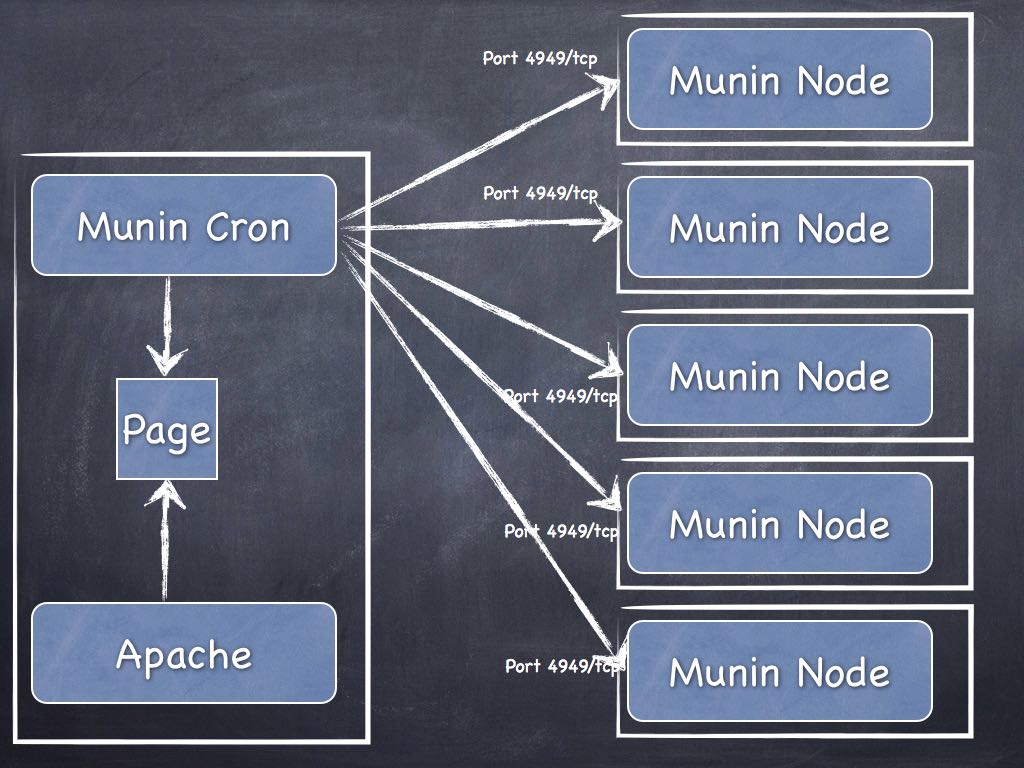
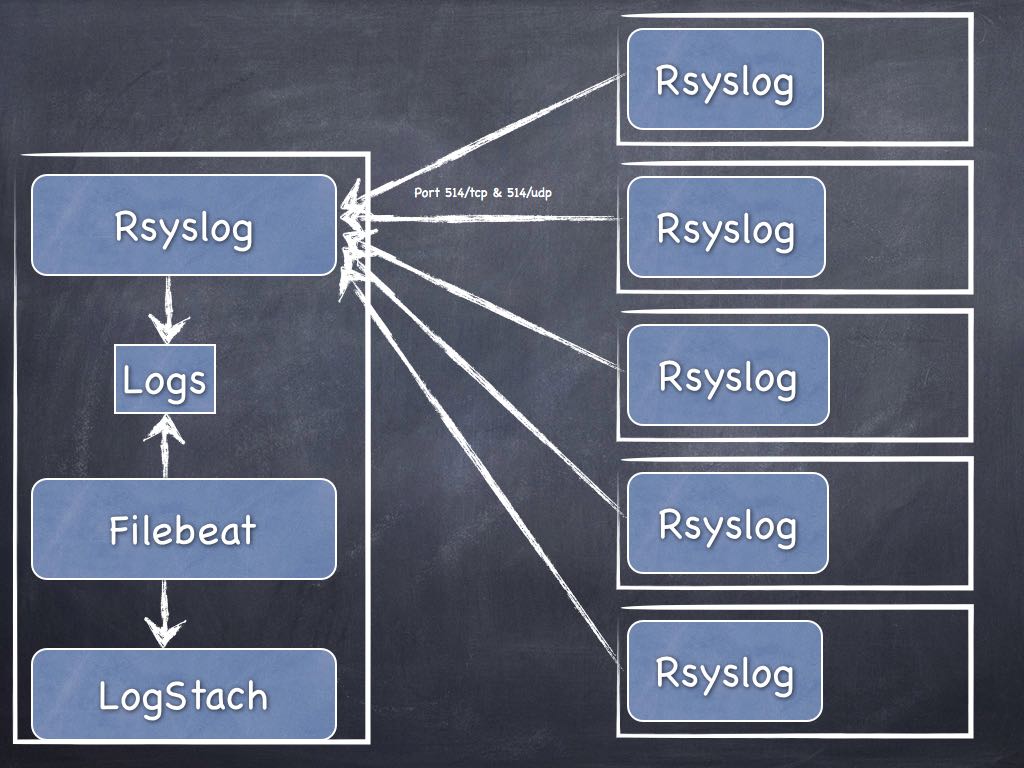
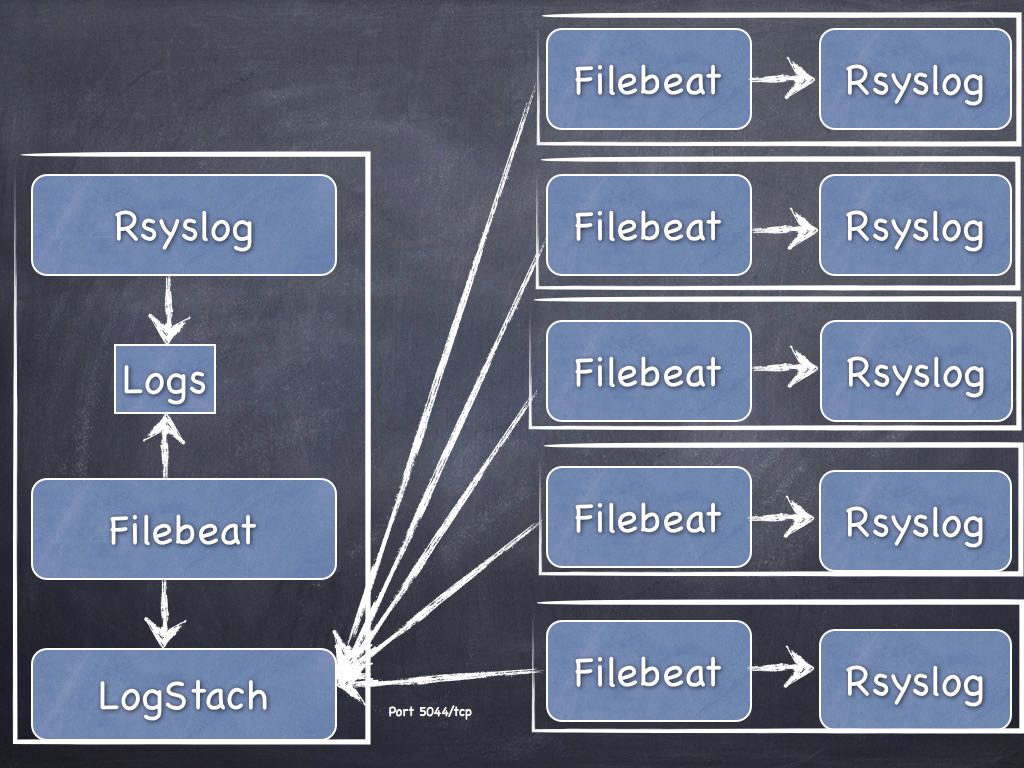
Maintenant, quel est la meilleure architecture pour la mise en place du Logstach ? Mettre un Filebeat sur tous les serveurs ou bien envoyer les informations via Rsyslog afin d’avoir qu’un seul Filebeat ? Vous avez une heure …
Quel est la solution la plus sécurisé pour avoir un Cloud Privé ? Imaginons une personne qui a une liaison ADSL, un Raspberry, un portable sous Mac et/ou Linux, et un smartphone sous Android. Quel est la solution la plus sécurisé ? Quel est la solution la plus ergonomique ? Je ramasse les copies dans deux heures .
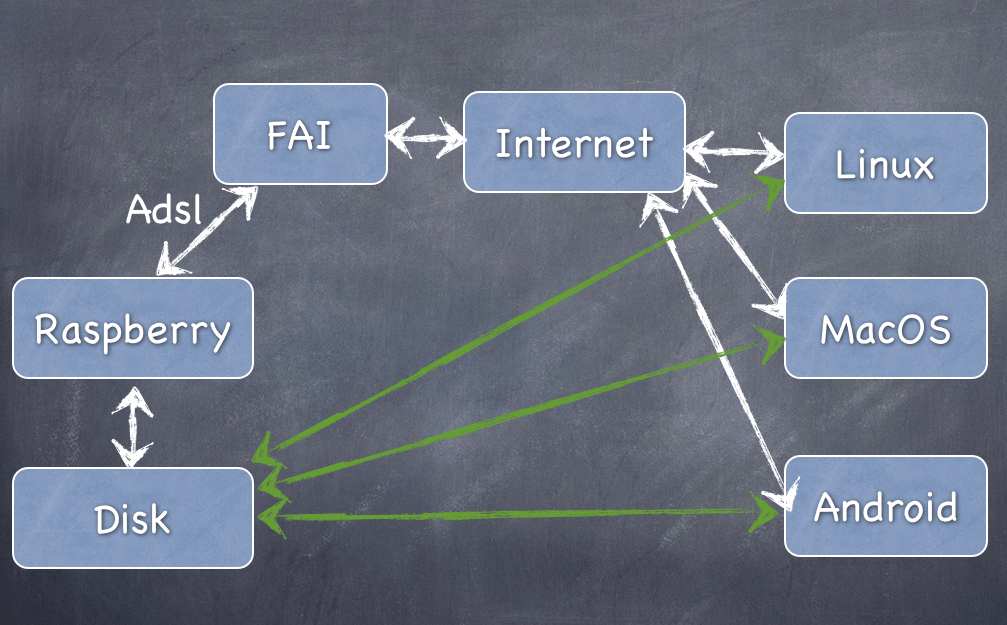
Solution n°1 OwnCloud : ( Site officiel : https://owncloud.org )
Lire les articles :
Outils sur Android :
J’ai donc finaliser l’installation de Munin Server/Node sur mon installation de Raspberry, maintenant je passe à Rsyslog. Voici la liste de mes Raspberry :
| Nom | Type | Processeur | RAM (Mo) | Version | IP | Utilisation | Munin-node |
|---|---|---|---|---|---|---|---|
| RASP1 / PAPI | 000f | ARMv6-compatible processor rev 7 | 443896 | 4.14.50+ | 192.168.0.70 | Maison de retraite | OK |
| RASP2 / OSMC | a22082 | ARMv7 Processor rev 4 | 764720 | 4.14.34-6-osmc | 192.168.0.80 | Munin Server / OSMC | OK |
| RASP3 | a020d3 | ARMv7 Processor rev 4 (v7l) | 949452 | 4.14.50-v7+ | 192.168.0.71 | Rsyslog Server | OK |
| RASP4 | a020d3 | ARMv7 Processor rev 4 (v7l) | 949452 | 4.14.50-v7+ | 192.168.0.72 | OK | |
| RASP5 | a020d3 | ARMv7 Processor rev 4 (v7l) | 949452 | 4.14.50-v7+ | 192.168.0.73 | OK |
Pour mémoire, mes posts sur Munin :
Quand je regarde les logs j’ai :
 Error output from irqstats:
     Argument "usb_fiq" isn't numeric in addition (+) at /etc/munin/plugins/irqstats line 95, <$in> line 18.
Le code en question qui pose problème :
sub sum (@) {
    my $sum = 0;
    $sum += $_ || 0 for @_;     # Avoid complaints about empty strings
    return $sum;
}
Je viens de voir qu’il y avait un fix : http://munin-monitoring.org/attachment/ticket/1462/munin-v2.0.6-raspberry_pi-irqstats-usb_fiq.patch fait le 01.04.2014 ?!





